
Looking for an Okta, Duo, or Ping alternative?
Extend MFA to every part of your environment, not just the modern parts. Okta, Duo, and Ping Identity are solid where modern infrastructure is solid. But most environments aren't. Legacy systems, command-line interfaces, local accounts, and on-prem infrastructure don't speak their language—and attackers know it. Silverfort enforces adaptive MFA across every resource, with no infrastructure changes and no exceptions.
- Legacy systems, OT, local accounts, on-prem — all protected, natively.
- One platform across cloud, hybrid, and on-prem. No silos, no gaps, no second tool.
- Deploy in days. Nothing to install, no application changes, no disruption. no disruption to production.
“Silverfort is the only solution that can respond in real time to lateral movement and ransomware propagation.”
– Billy Chen, Group VP of Cyber Security, RWC
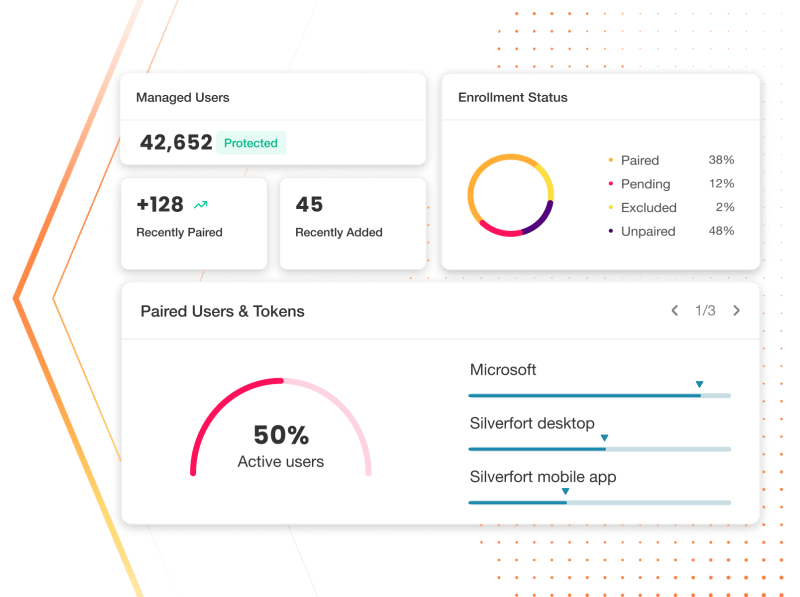
Where Okta, Duo, and Ping stop, and how Silverfort picks up
Most MFA tools cover the modern parts of your environment well. The gaps show up in what’s left: legacy systems, on-prem infrastructure, and local accounts. Silverfort closes those gaps without touching what already works.
If legacy systems and OT environments are left unprotected
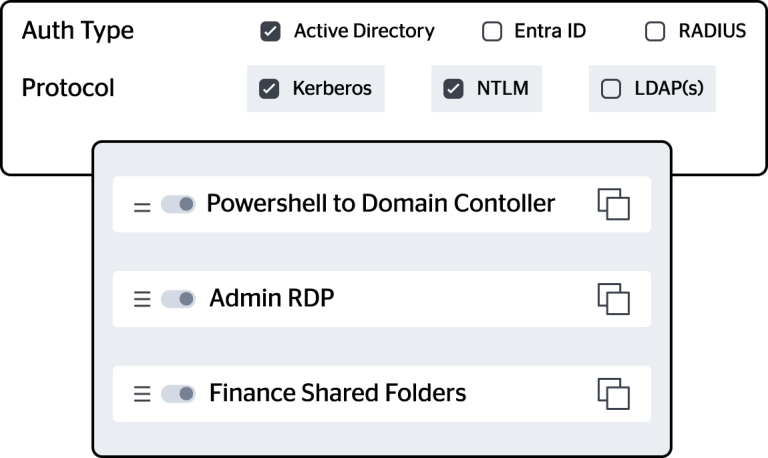
Silverfort enforces MFA on anything that authenticates through Active Directory: RDP, CLI tools, file shares, OT systems, and local Windows accounts. No connector or agent required.
If local Windows accounts sit outside your MFA policy
Silverfort enforces MFA on anything that authenticates through Active Directory: RDP, CLI tools, file shares, OT systems, and local Windows accounts. No connector or agent required.
If static policies are letting attackers bypass through lateral movement
Silverfort extends protection to local accounts that exist outside Active Directory, identities that have historically been invisible to enterprise MFA. Learn more about Silverfort for local Windows accounts.
If you're managing separate tools for cloud and on-prem
Silverfort delivers one platform across Active Directory, cloud IdPs, and hybrid environments, live in days with no agents and no application changes.
How Silverfort compares
Silverfort extends MFA anywhere to protect the unprotected.
| Capability | Silverfort | Cisco Duo | Okta | Ping Identity | Why It Matters |
|---|---|---|---|
| Coverage | Every access pointLegacy, CLI, file shares, local Windows account logins, and more | Coverage requires a deployed connector or agent per system; legacy resources without one are left uncovered. | Okta and Ping depend on SAML integrations that legacy systems don't support. Wherever a connector isn't deployed, there's no coverage. |
| OT/ICS coverage | MFA on any OT resourceAuthenticates through Active Directory — no changes to OT application code | Possible through additional products or per-system integration, not native to the core MFA service | OT and industrial systems often can't host endpoint software or support modern auth — approaches that depend on per-device agents can't reach the assets that most need protection. |
| Policy intelligence | Real-time, risk-adaptive decisionsBased on user context & detection signals | Risk-based policies require additional configuration and don't apply natively to AD or RADIUS flows | Static policies can't stop dynamic attacks. Controls need to adapt to what's happening now, not what was configured last quarter. |
| Deployment effort | No app changes, no infrastructure rewritesSeamless layering over your existing environment | Agent-based or SAML-dependent integrations required per system | Every system that requires a custom integration is a system that stays unprotected until someone gets to it. |
| Architecture | Unified MFA enforcementAcross your entire identity ecosystem | Separate MFA coverage per tool per environment | Okta handles SaaS. Duo handles endpoints. Ping handles on-prem apps. Three tools, three policies, and gaps at every seam. |
| Attack surface | Full coverageNo alternate authentication paths left unprotected | Unprotected legacy and on-prem paths remain available to attackers | A single, unprotected authentication path is enough for lateral movement to succeed. |
| Scalability | Low-touch rolloutAcross hybrid & multi-cloud environments | Manual integrations and per-system configurations required | Manual onboarding doesn't scale. Coverage gaps grow as fast as your environment does. |
| Threat response | Powered by ISPM & ITDRMFA triggered by live ISPM insights & ITDR detections | Limited or disconnected from threat detection | MFA that doesn't know a threat is active isn't adaptive. It's scheduled. |
NOTE: Coverage varies by product tier and integration configuration. Silverfort’s coverage does not depend on app-level integrations or SAML support. This comparison reflects the documented capabilities of leading MFA solutions including Cisco Duo, Okta Verify, and Ping MFA as of July 20, 2026. Capability details sourced from public vendor documentation.
| Capability | Silverfort | Cisco Duo | Okta | Ping (varies by tier & integration) |
|---|---|---|
| Coverage | Every access point | Coverage requires a deployed connector or agent per system |
| OT/ICS coverage | MFA on any OT resource | Possible through additional products, not native to core MFA |
| Policy intelligence | Real-time, risk-adaptive | Risk-based policies don't apply natively to AD or RADIUS flows |
| Deployment effort | No app changes | Agent-based or SAML-dependent integrations required per system |
| Architecture | Unified MFA enforcement | Separate MFA coverage per tool per environment |
| Attack surface | Full coverage | Unprotected legacy and on-prem paths remain available to attackers |
| Scalability | Low-touch rollout | Manual integrations and per-system configurations required |
| Threat response | Powered by ISPM & ITDR | Limited or disconnected from threat detection |
How Silverfort enforces MFA everywhere
Traditional PAM primarily secures privileged credentials inside the vault. Silverfort extends protection to the authentication layer itself, so even if credentials are compromised, attackers can't move. With MFA, Just-in-Time access, tier segmentation, and access block, Silverfort delivers scalable protection and measurable risk reduction across all identity types.
Reach every access point
If it authenticates, it's protected. Silverfort extends MFA across every AD-managed request — legacy apps, command-line tools, RDP, SSH, and OT infrastructure , and l and reaches local Windows accounts that sit outside AD entirely. No carve-outs.
Respond to live threats at runtime
Silverfort triggers MFA dynamically based on user behavior, device risk, asset sensitivity, and live threat signals—so your controls adapt in real time, not on last quarter's configuration.
No rip-and-replace
Keep your existing MFA, extend it, or consolidate onto Silverfort. Whichever path you choose, nothing breaks and nothing gets left unprotected.

"The main problem was that we couldn't do MFA on our internal network for Windows services, and Microsoft's on-prem MFA options didn't have the full capabilities we were looking for. Silverfort let us enforce MFA across all required systems with minimal effort."
Infrastructure and Security Lead, Digital and Strategic IT, Southampton City Council

Trusted by security teams protecting complex, hybrid environments







10B
Authentications analyzed and protected everyday.

SC Media Awards Best Identity Management Solution 2026

Ranked 4.8 Gartner Peer Insights
See how Silverfort compares to Duo, Okta, or Ping Identity in your environment
Silverfort integrates natively with all three —extending MFA coverage to every resource they can't reach, without replacing your existing investment.


FAQs
How is Silverfort different from cloud-first MFA solutions?
Cloud-first MFA tools succeed at protecting SaaS apps and cloud infrastructure, but they rely on endpoint software or SAML integrations that legacy and on-prem systems don’t support. Silverfort integrates at the identity layer—specifically with Active Directory and RADIUS—so it enforces MFA on any resource that authenticates through those protocols, with no changes to the protected system.
Does Silverfort require any software installation on endpoints or applications?
No. Silverfort integrates directly with your identity infrastructure without installing software on endpoints or modifying the applications it protects. This means faster deployment and no ongoing endpoint management overhead.
How long does deployment take?
Most organizations are enforcing MFA across their environment within days, because Silverfort requires no changes to applications or infrastructure.
Does Silverfort work alongside our existing MFA or IdP?
Yes. Silverfort is designed to complement existing identity tools, not replace them. It fills the gaps that SAML-based MFA solutions leave behind—extending coverage to legacy systems, on-prem infrastructure, and local Windows accounts—while your existing stack continues to handle what it does well.
Can Silverfort protect local accounts?
Silverfort discovers local Windows accounts across your endpoints—including hidden or unmanaged ones—and enforces MFA by binding them to a AD identity, closing a gap attackers commonly exploit for persistence and lateral movement. Learn more about Silverfort MFA for Windows Logon.
Does Silverfort work with Active Directory in a hybrid environment?
Silverfort was built for hybrid environments. It integrates natively with both on-prem Active Directory, Microsoft Entra ID, or any other IdP, providing unified visibility and policy enforcement across your entire identity infrastructure. Learn more about how to protect your AD environment.
Can Silverfort enforce MFA on RDP, command-line access, and file shares?
Yes. Any resource that authenticates through Active Directory or RADIUS—including RDP sessions, SSH, shared file systems, and CLI tools—can be protected with Silverfort Universal MFA. This includes systems running on legacy operating systems or custom protocols.
Is Silverfort a replacement for Cisco Duo?
Silverfort can fully replace Cisco Duo, or work alongside it to extend coverage to the resources Duo reaches only with a per-system agent or integration: legacy systems, on-prem infrastructure, command-line tools, and local Windows accounts. Duo’s strength is endpoint and cloud app coverage, but it depends on agents and integrations that legacy and OT environments typically don’t support. Many organizations start by using Silverfort to extend Duo and migrate fully once they see the coverage difference. See how Silverfort can extend Duo MFA to corporate resources that couldn’t be protected before.
Can Silverfort replace or extend Okta MFA?
In most cases, Silverfort extends Okta, rather than replacing it, covering the legacy systems, OT infrastructure, and local accounts Okta reaches only with a per-system connector. Okta extends to on-prem via RADIUS and LDAP agents, but each system needs its own integration, so coverage stops wherever one isn’t deployed or the protocol isn’t supported Some organizations do consolidate onto Silverfort as their single MFA layer over time, but the more common path is running both together. For Okta customers, learn how Silverfort’s Okta Bridge enables Okta web SSO flows to in-prem applications and applies security controls to those resources.
Can Silverfort replace or extend Ping Identity MFA?
Silverfort extends Ping Identity’s coverage rather than replacing it. Ping handles cloud and federated app access well, and reaches on-prem systems through per-app RADIUS and PingFederate integrations—but each one is configured individually, so genuinely legacy protocols, command-line tools, and local accounts outside Active Directory often fall outside that model. Silverfort covers those gaps, giving you full-environment coverage without a rip-and-replace project. See how Silverfort integrates natively with PingID.
Can Silverfort serve as our single MFA platform instead of running multiple tools?
Yes. While most organizations start by using Silverfort to extend their existing Okta, Duo, or Ping deployment, organizations that want to consolidate can also use Silverfort as their single MFA layer across the entire environment, cloud, on-prem, and legacy, from one policy engine. Learn more about Silverfort Universal MFA.
What happens if an authentication attempt is flagged as high-risk?
Silverfort evaluates every authentication request at runtime against your defined policies. When a request is flagged— based on user behavior, location, asset sensitivity, or anomaly signals—Silverfort can step up authentication, block access, or alert your SOC.
How does Silverfort handle MFA fatigue and push bombing attacks?
MFA fatigue attacks succeed because traditional push-based MFA puts the burden of defense on the end user. Silverfort addresses this at the policy layer instead. Every authentication request is evaluated inline at runtime against live risk signals—behavioral anomalies, impossible travel, and MFA bombing indicators—so Silverfort can detect a fatigue attack in progress and block access automatically, without waiting for a user to make the right call under pressure. See how this works in this webinar, Identity Under Attack: Detection Strategies that Work.
Does Silverfort support passwordless authentication?
Yes. Silverfort integrates with passwordless authentication methods—including FIDO2 security keys—through the Silverfort Identity Bridge, which federates these methods across cloud, on-prem, and hybrid environments from a single policy engine, with no changes to applications. This extends modern, phishing-resistant authentication to the same legacy systems, CLI tools, and on-prem infrastructure that cloud-first solutions can’t reach—including fully air-gapped environments, where FIDO2 works alongside OTP. Silverfort works alongside your environment’s existing first-factor authentication rather than replacing it.
Does Silverfort support compliance frameworks like HIPAA, NIST, NHS CAF, CJIS, or CMMC?
Yes. Silverfort’s MFA enforcement supports the authentication and access control requirements of major compliance frameworks, including HIPAA, NIST, NIST 800-63, NHS’ CAF, CJIS, CMMC, PCI-DSS 4.0, and NIS2. Every authentication decision generates detailed access logs and policy enforcement records, giving you audit-ready evidence across your entire environment, not just the systems a connector-based MFA tool can reach.