In our previous blog, Local Accounts Unlocked, we explored why local accounts represent one of the biggest Identity Security blind spots in modern environments. We also introduced how Silverfort enables end-to-end visibility into local account authentications.
But visibility is only the first step. Local administrator accounts are actively exploited in real-world attacks and remain a common path for lateral movement.
Being able to track when local accounts are used is critical; however, it does not prevent credential misuse. If a local administrator account is compromised, it can still be used for privilege escalation and lateral movement across the entire hybrid environment. It’s an easy way in.
So once visibility is in place, the next question becomes clear:
How do you actually protect local accounts?
Today, we’re excited to share that Silverfort now extends Identity Security to local Windows accounts – enabling MFA and access-based controls at runtime.
Why protecting local accounts has been so difficult
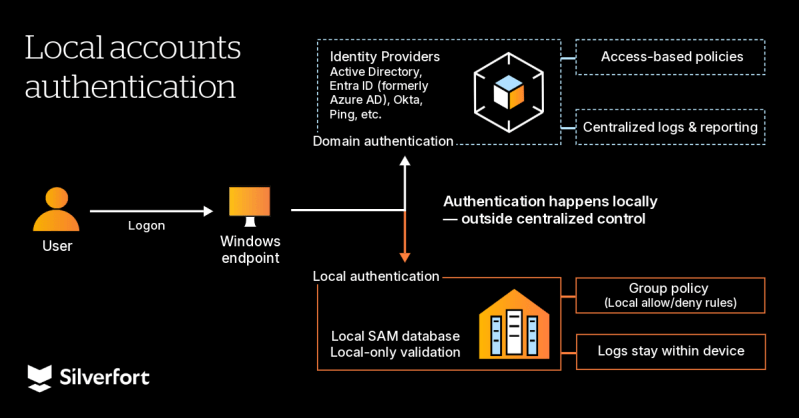
From a security perspective, the challenge with local accounts is not simply that they exist within the environment – it’s that they operate outside the traditional identity control model. While domain and cloud identities are managed through centralized authentication systems, local accounts follow a different path. That architectural difference has made protection far more difficult.
Let’s have a look at the key limitations of local accounts:
Local accounts authenticate outside centralized control
Local accounts authenticate directly to the endpoint, without involving Active Directory (AD) or a centralized Identity Provider (IdP). As a result, traditional security controls cannot be applied at the moment of authentication. There is no opportunity to evaluate policies, enforce MFA, or restrict access in real time based on the context. Even if organizations secure domain identities, local logins often remain outside that enforcement scope, leaving a gap that attackers can exploit to expand their initial access.
High privilege by default
Local administrator accounts often have full control over the endpoint. They can install software, modify system configurations, disable security tools, and create new accounts. In many environments, these privileges are permanent rather than temporary, creating standing access that attackers can exploit immediately after compromise.
Credential management does not equal authentication governance
Some organizations use PAM tools to rotate or vault local administrator passwords. While this can improve password hygiene, it does not control how those credentials are used in real time. Once a password is compromised, there is no additional challenge, context evaluation, or enforcement to be applied at logon, and attackers can proceed to privilege escalation and lateral movement without triggering any security controls.
Shared accounts reduce accountability
Local administrator accounts are often shared across multiple employees, especially in operational or legacy environments. When multiple users use the same local account, activity is tied to the account itself rather than to an individual user. This makes it difficult to determine who accessed the system, complicating investigations and compliance reporting, and slowing down incident response efforts.
Why this matters now
Local account risk is not theoretical.
Federal agencies such as the FBI and CISA have repeatedly warned that unmanaged local administrator accounts are actively exploited in real-world attacks, particularly for privilege escalation and lateral movement.
In large enterprise environments with thousands of Windows endpoints, it is common to find hundreds –and often thousands – of unmanaged local accounts. Many of these accounts are rarely reviewed, and some retain administrative privileges long after they are needed. At scale, this creates a broad and often invisible attack surface.
Cyber insurers and compliance frameworks increasingly expect consistent security controls across privileged access paths. However, local accounts frequently remain outside of traditional MFA tools’ scope, creating identity gaps that can impact underwriting decisions and risk assessments.
Taken together, regulatory pressure, attacker behavior, and enterprise-scale sprawl make local account protection not just a technical improvement – but a strategic necessity.
From visibility to enforcement: Securing local accounts with Silverfort
Silverfort now extends protection to local accounts on Windows endpoints, ensuring they are secured just like domain identities.
Here is how that works in practice.
Discover and manage local accounts automatically
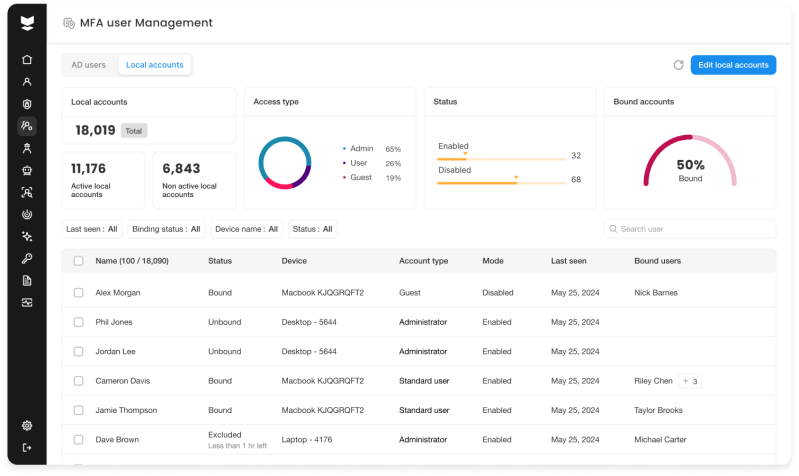
Silverfort for Windows Logon (S4WL) detects local accounts across Windows endpoints and consolidates them into a centralized Local Accounts view.
Security teams gain immediate insight into:
- Account type
- Associated device
- Last logon
- Binding status (whether the local account is linked to an Active Directory identity for MFA enforcement and attribution)
This replaces manual, device-by-device reviews with a unified inventory of local accounts across the entire environment.
Enforce access-based policies on local logins in real time
Silverfort evaluates local Windows logins in real time. Organizations can now apply defined policy actions, including Allow, Deny, Notify, or MFA, to local logins at runtime, helping block unauthorized access and verify legitimate users through MFA.
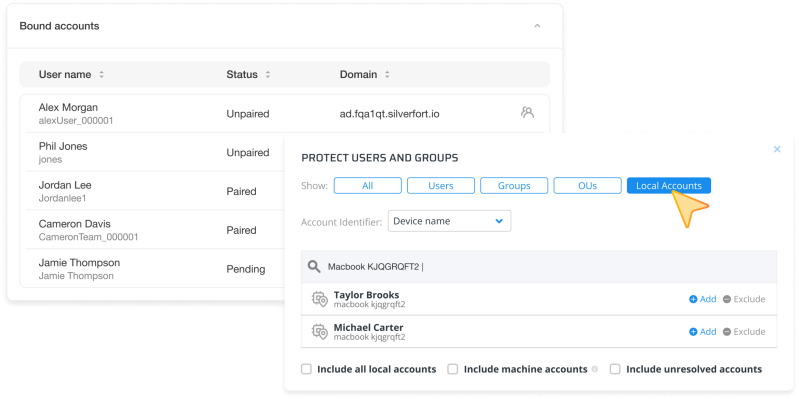
To enable MFA for local accounts, Silverfort binds the local account to an AD identity. This allows MFA to be triggered through the bound AD user, restoring identity-based enforcement even for device-bound accounts.
With Silverfort, security teams can now enforce security controls for local accounts at the moment of authentication, proactively reducing the risk of lateral movement.
Monitor local accounts activity for auditability and investigations
All local login activities are recorded in Silverfort’s Authentication Logs. This provides centralized auditability, supports investigations, and ensures local accounts are no longer outside the organization’s identity monitoring framework.
Completing the local accounts’ Identity Security story
For a long time, local accounts existed outside the Identity Security scope.
With Silverfort, organizations can move beyond simply seeing local account activity to actively enforcing security controls at runtime. Local accounts become visible, controlled, and protected – just like domain and cloud identities.
By closing this critical blind spot, security teams reduce lateral movement risk, strengthen accountability, and bring local accounts into the broader identity security strategy. This not only improves security posture but also saves time during audits, investigations, and routine account governance activities.
Ready to discover and protect local accounts in your environment? Schedule a session with one of our experts or, if you are an existing customer, reach out to your customer success manager.