
Service accounts are among the most privileged and least-managed identities in the enterprise. They enable applications, scripts, and systems to authenticate with no human intervention, but often receive limited oversight once they become operational.
Ownership becomes unclear, credentials remain unchanged for long periods, and teams lack visibility into how the accounts are actually being used.
This combination of privilege and limited oversight creates both a security problem and an identity governance problem. Security teams need to prevent compromised accounts from being used for lateral movement. Identity teams need to establish ownership, purpose, and appropriate access. Neither can solve the problem alone.
Securing service accounts at scale requires five disciplines: discovery, prioritization, ownership, enforcement, and automation.
This article explains what effective practice looks like at each stage and how Silverfort’s Identity Security platform puts it into operation.
Discover: Know what you have before you try to protect it
The starting point is knowing which service accounts exist, how many there are, and which systems depend on them. Most organizations can’t answer that question with confidence.
Service accounts are used by the various projects, spread across domains, and often outlive the project or the person who built them. Naming conventions across legacy service accounts (svc-, admin-) catch some; the rest look like ordinary user accounts unless someone goes looking.
A reliable inventory combines configuration signals with an understanding of how each account behaves. This means evaluating AD attributes, such as passwords set never to expire and organizational placement, alongside the repetitive, machine-like authentication patterns that distinguish service accounts from human users: the sources they authenticate from, to which destinations, using what protocols.

Silverfort automates this the moment your domain controllers connect, adding direct detection of Managed Service Accounts (MSA) and whatever organizational context already exists—OUs, security groups—as further signals.
From there, service accounts generally sort into a few behavioral categories:
- Machine-to-machine accounts: authenticating on behalf of an application
- Hybrid accounts: a human identity doing machine-like work, such as a scheduled task running under someone’s personal login
- Scanners: authenticating from a small number of sources to many destinations or vice versa
- Dormant accounts: no observed activity at all

Two things are worth calling out on their own.
Interactive login. A person signing directly into an account meant only for machine use is a distinct risk signal from the hybrid category above, and needs a different fix: stopping the human login, not migrating the whole account.
Dormant accounts are trickier to confirm than they sound. Some that look inactive by a simple logon check are still working through Kerberos delegation, authenticating on another identity’s behalf without ever generating a direct logon event of their own. This is why “dormant” should be a conclusion drawn from actual authentication activity, not a guess based on one log source.
Silverfort’s behavioral analysis is what makes that distinction possible automatically, instead of requiring manual log correlation.
Visibility also does double duty for governance: once you know what an account does and where it’s used, you can start answering the questions an auditor or a regulator will eventually ask—what it’s for, whether it should still exist—well before enforcement comes into play.
Prioritize: Identify the accounts that require attention first
A full inventory can easily run into thousands of service accounts. The right way to prioritize weighs both what an account can reach and how it’s actually behaving. Accounts generally warrant early attention when they:
- Connect to critical applications, infrastructure, or sensitive data
- Carry extensive or highly privileged permissions
- Show a high-risk profile based on how they’re used
- Show signs of brute-force or otherwise suspicious activity
- Are used interactively
- Behave inconsistently with their expected purpose
- Have no clearly identified owner
Doing this manually means cross-referencing permission exports, application inventories, and log data by hand. Silverfort scores every discovered account against these factors automatically and surfaces the specific signals behind each score, so the sorting work is largely done before an identity or security team ever looks at the list.
Establish ownership and accountability
Discovery and risk scoring tell you what an account does. Ownership tells you who to call when it needs attention—for an access review, an incident, or a decision about whether the account should be retired. It’s arguably where identity and security responsibilities meet most directly: identity teams typically own the lifecycle question (does this account, and its access, still make sense), while security teams lean on the same data to investigate. Either way, it’s a basic governance requirement, and one of the hardest to maintain at scale: owners change roles, leave the organization, or were never formally assigned to begin with.
Maintaining that mapping by hand means chasing down whoever last touched the account and hoping the answer still holds.

Silverfort keeps it current automatically—syncing owner information from a selected Active Directory attribute (supporting up to five owners per account, as AD groups, email addresses, or custom IDs) or through the ServiceNow CMDB integration, and flags any account left with no owner, or with an owner who’s since left the organization. Owners can also be assigned or corrected by hand wherever no existing system already holds that mapping.
Protect: Limit each account to what it actually does
Once you know which accounts matter most, the next step is limiting each one to what it actually needs, not what it’s technically entitled to. Most service accounts carry far more access than they use: an account might have permissions across dozens of systems while, in practice, only ever talking to one. The right control is a policy scoped to an account’s real, observed sources, destinations, and protocols.
Rolling that out safely means starting in monitor-only mode: watch for a stretch of stable, unchanging behavior, and only move to active enforcement once that pattern holds. How long counts as “stable” is a judgment call long enough to see the account’s full cycle of activity, including anything that only happens monthly or quarterly.
Each account type calls for a different version of this:
- Machine-to-machine: start with a notify-only policy, let it run until the pattern is confirmed stable, then move to deny.
- Hybrid: find the person behind the behavior and move the automated task onto a dedicated service account instead of their personal login.
- Scanners: restrict whichever side of the connection (sources or destinations) is smaller and more predictable.
- Dormant: block authentication outright, monitor for a period to confirm nothing breaks, then disable or remove the account.
Silverfort applies these controls through Virtual Fencing, building and enforcing a runtime policy around the account’s observed sources, destinations, and protocols. Behavioral stability is measured by the number of consecutive days those values remain unchanged, with a configurable default baseline of 90 days. You can also review a live policy against recent activity and approve newly observed legitimate access directly, instead of unwinding the policy and starting over. Doing this one account at a time doesn’t hold up once you’re managing more than a handful, which is where automation comes in.

Automate: Make it hold at scale
None of the above scales as a manual, account-by-account exercise once an organization is managing hundreds or thousands of service accounts, with new ones appearing continuously as teams deploy new applications and integrations. At that point, the discover-to-protect lifecycle needs to run on its own.
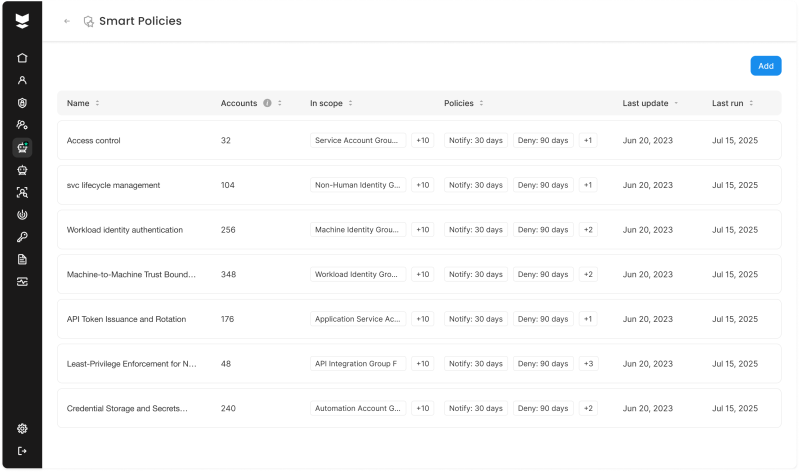
Silverfort automates this through Smart Policy: define a scope—specific accounts, security groups, or OUs—along with how many days of stable behavior should trigger a notify policy and how many should trigger deny, and the notify-to-deny progression described above runs automatically, including for service accounts that don’t exist yet. Groups and OUs stay in scope, so new accounts get discovered, baselined, and protected without manual setup.
For organizations that already track service accounts and their dependencies elsewhere, Silverfort’s ServiceNow CMDB integration keeps that system and Silverfort’s inventory in sync bidirectionally, including which application each service account belongs to. For anything outside ServiceNow, Silverfort’s Service Account APIs let you read and update service account data and policies programmatically, so the same automation can plug into whatever CMDB, ticketing, or governance tool an organization already runs.
From visibility to enforcement
To secure service accounts effectively, organizations need to:
- Discover and classify accounts through authentication behavior
- Prioritize risk using privilege, activity, and business context
- Enforce an approved authentication pattern for each account
- Automate protection as accounts and environments change
This approach reduces excessive access, removes unused accounts, and prevents compromised service accounts from being used for lateral movement.
Service accounts will remain essential to enterprise operations. The security objective is to ensure that every account is visible, owned, and restricted to its intended authentication activity.
Silverfort enables organizations to move from incomplete inventories and posture findings to enforceable protection at runtime—without credential rotation, agents, proxies, or application changes.
Request a demo to see how Silverfort puts this approach into practice or take a self-guided tour.