
Executive summary
The Silverfort research team has uncovered that the way Anthropic stores Claude Code CLI credentials on macOS makes it easy for any process running under the user’s own permissions to steal the user’s Anthropic account credentials, and by extension, any connected MCP server credentials. A single silent read returns that entire bundle, which an attacker can then replay from another machine to act as the user.
macOS Keychain has a proper secure-storage mechanism that requires the user to re-enter their password or biometric confirmation before releasing a secret to a requesting process. Claude Desktop uses this correctly. If another process tries to access the stored credential, macOS prompts the user to re-authenticate. Claude Code CLI does not. It’s implemented in a way that lets any user-mode process pull the credential with no re-auth prompt at all, and we will go into detail about this in this blog.
This isn’t technically a vulnerability, it’s an implementation design flaw, a security weakness: credentials that should require re-authentication don’t. Exploiting it doesn’t require sophisticated technique beyond standard “get code running as the user,” a much lower bar than privilege escalation. The design flaw affects any macOS user running Claude Code CLI (not Desktop, and not Windows/Linux CLI users, since those rely on file-based storage where existing AV/EDR heuristics should already watch for tampering).
The net result: if malicious code is running under a user’s account, it can silently read Claude credentials, no privilege escalation, no password prompt, no alert, and move laterally accessing MCP servers. On macOS, Keychain is the better method compared to file-based storage, but because Claude Code CLI skips the re-auth step, that advantage disappears, and no existing AV heuristic is watching for this the way file-access heuristics exist on other platforms. If an endpoint is taken over, an attacker gains access to the user’s Anthropic account and any connected MCP servers, and can influence anything those servers control, the company’s codebase in GitHub, its knowledge base in Atlassian, or other sensitive MCP connectors.
Silverfort reported this finding on June 25th to Anthropic via HackerOne, following its responsible disclosure practice. Anthropic promptly replied, and after discussing with their team, they confirmed they are tracking a tightening of the Keychain item’s access control as a hardening improvement and think it’s “a defense-in-depth change…worth making”. Anthropic did not object to Silverfort publishing the research.
Guidance for defenders
Until this is remediated, organizations running Claude Code CLI on macOS should create an alert any time the same token is being used across different machines. Beyond traditional detection and response, organizations should consider an Identity Security platform that can control the use of static or temporary credentials, and flag when the same token is used from two different machines—a strong indicator of stolen credential use. Security teams should monitor for anomalous or unexpected process access to the Keychain entry used by Claude Code CLI, unusual access patterns to this credential store are a meaningful indicator of potential compromise and should be treated as a trigger for investigation.
Background
AI coding agents hold real credentials now. To do their work, they log in and keep a token on the machine, and the Claude Code CLI is no exception. When you run Claude, it signs in with an OAuth bundle: a short-lived access token and a long-lived refresh token. The refresh token is the part that should worry you. It can be traded for new access tokens until someone revokes it, so it is not a temporary session. It is standing account access sitting on a laptop.
Where that OAuth bundle lives depends on your operating system. On two of the three platforms (Linux and Windows) it is a plain file on disk. On macOS it goes into the OS Keychain – the right instinct, but with a catch: by default, the item is locked to the program that created it, and here that’s security a tool that any process can run. So the lock is there yet never locks, and any process under your account gets the tokens with no additional prompt for the user to enter their password.
We will follow the Claude Code CLI credential across all three platforms, look closely at macOS defect, cover a low-footprint trick for reusing a stolen bundle, and end on the question every enterprise will ask: doesn’t the new Claude apps gateway make this irrelevant? The short answer is no.
Secrets in a file sound worse, but it’s the one you can watch
On Linux and Windows, the credentials go into a plaintext JSON file, with no OS keystore involved. That sounds like a generally weaker approach, but a credentials file on disk is a problem defenders already know how to handle. It’s a classic target, and endpoint tools like antivirus and EDR can watch for a process reaching into a file full of tokens. There’s a known place to put a control and something concrete to alert on. On macOS, that safety net goes away, as we’ll see.
The Claude Code CLI documentation says where the file lives:
“On Linux, credentials are stored in
~/.claude/.credentials.jsonwith file mode 0600.”“On Windows, credentials are stored in
%USERPROFILE%\.claude\.credentials.jsonand inherit the access controls of your user profile directory, which restricts the file to your user account by default.”
One wrinkle: CLAUDE_CONFIG_DIR moves this file somewhere else, so detection rules that hard-code the literal path will miss those installs.
Inside that file is everything worth taking: an OAuth access token (sk-ant-oat…), the long-lived refresh token (sk-ant-ort…), an expiresAt timestamp, and the token scopes. The same store also holds any MCP-server OAuth tokens and plugin secrets you have connected. The refresh token is the one that matters, because a single read of it buys standing account access. On Linux and Windows, here are some suggestions on what to watch:
- File integrity monitoring. Treat
~/.claude/.credentials.json(and theCLAUDE_CONFIG_DIRvariant) as a sensitive object. The alert you want is a read or open by any process that is not the claude binary. On Linux you can do this with an auditd watch (auditctl -w /home/*/.claude/.credentials.json -p rwa -k claude_creds) or eBPF open telemetry. On Windows, use object-access auditing (Event ID 4663) with a SACL, or EDR file-read telemetry. - Permission drift. The Linux file should stay at
0600. If it turns group- or world-readable, that is a warning sign on its own. - Content signatures. Treat the prefixes sk-ant-oat (access) and sk-ant-ort (refresh) as credential indicators for DLP and AV. Flag them in files outside the config directory, in archives, on the clipboard, and in outbound traffic. A hit on the refresh-token prefix is the most serious one.
- The identity angle. The best signal is not on the endpoint at all. A token that first appears on one host and then shows up from another is a textbook theft indicator. Watch for the same OAuth session turning up from a new device, location, or IP soon after a local read. Catching that kind of cross-host reuse is what an identity-threat platform is for.
Keep the companion file, ~/.claude.json, on your radar too. It is not the secret store, but it holds the account identity (oauthAccount,userID), which is the other half of a working session. More on that in the next section.
The lock that doesn’t lock: On macOS the Keychain is the right idea – but must be correctly implemented
macOS breaks that pattern with the CLI keeping its credentials in the Keychain rather than in a .credentials.json file. The docs are explicit:
“On macOS, credentials are stored in the encrypted macOS Keychain.”
This is the correct instinct. An encrypted, OS-guarded store beats a flat file every time. But a Keychain item is only as strong as the access-control list (ACL) attached to it, and this is where this particular item falls apart.
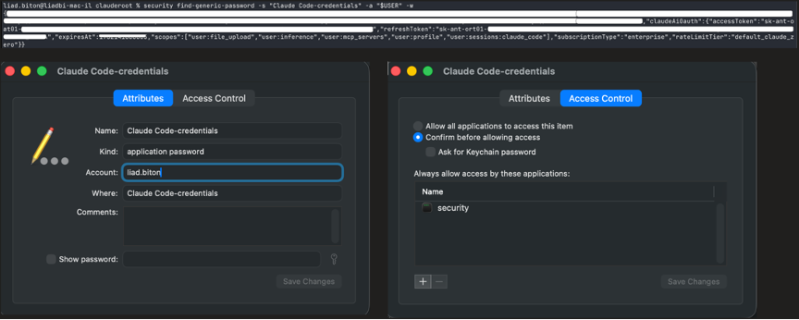
Claude Code CLI creates its Keychain item by shelling out to /usr/bin/security add-generic-password, and it passes no access-control arguments: no -T to trust a specific application, no -A to allow any application. The item therefore inherits the Keychain default access control list (ACL). The macOS security(1) man page spells out what that default does:
“By default, the application which creates an item is trusted to access its data without warning. You can remove this default access by explicitly specifying an empty app pathname: -T “”.”
On this code path the application that creates the item is /usr/bin/security itself. So the trusted reader recorded on the item is /usr/bin/security, sitting in the apple-tool: partition that macOS reserves for Apple’s own signed tools. That default is the whole problem. /usr/bin/security is a general-purpose, Apple-signed command-line tool, and any process running under your account can call it without special privileges. An ACL whose only trusted reader is the security tool is satisfied by any process that runs the security tool, which means every process on the machine. The ACL is meant to control which program may read the secret. In practice, it controls nothing, because any program can read it by asking a standard binary to do the reading.
The result is a one-line, silent read:
security find-generic-password -s "Claude Code-credentials" -a "$USER" -w
No Touch ID, no login-password prompt, no elevation. The full credential JSON comes back: the access token, the long-lived refresh token, and any MCP or plugin secrets that share the item.
Anthropic already does this right with Claude Desktop, so why not Claude Code CLI?
The clearest evidence that this is an implementation choice rather than a macOS limitation is that Anthropic already does it correctly in Claude Desktop. Claude Desktop runs on the same operating system, for the same user, and guards the same kind of secret. It does this with Electron safeStorage, and the design is worth spelling out, because it is not the same as the CLI’s. safeStorage keeps an encryption key in the Keychain and stores the actual tokens as ciphertext in a file on disk. The Electron docs describe how that key is protected:
“Encryption keys are stored for your app in Keychain Access in a way that prevents other applications from loading them without user override.”
The Keychain item holding that key lists only the signed Claude app on its ACL, and its partition is pinned to Anthropic’s developer team, so a security read from anything else is challenged for the login password. The ciphertext on disk is useless without the key, and the key does not come out without that prompt.
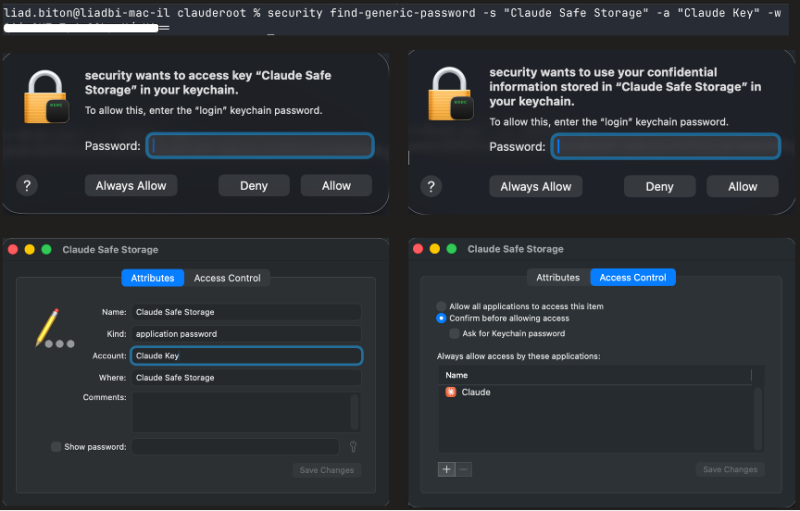
The two designs appear similar but behave very differently. The CLI stores the tokens in Keychain with an ACL that allows any process to read them. Claude Desktop stores only a key in Keychain, binds that key to its own signature, and keeps the encrypted tokens in a file that is useless by itself. Same operating system, same user, same type of secret: one can be read silently by any process, while the other requires user approval. The difference comes down to how the Keychain item is created and what it protects.
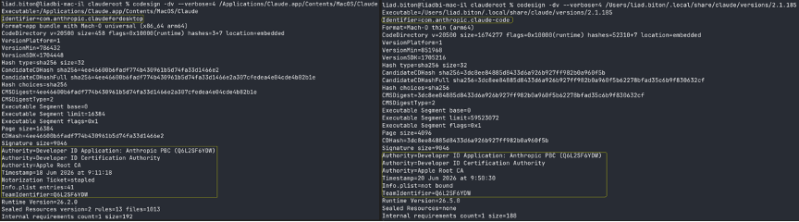
Root cause: the CLI hands item creation to /usr/bin/security instead of using the native Keychain Services API to bind the item to the Claude binary’s own code signature, which is the pattern Claude Desktop already ships. The security tool cannot bind an item to the program that called it. Only the native API can. In weakness terms this is CWE-732 (incorrect permission assignment for a critical resource) and CWE-522 (insufficiently protected credentials).
Rebuilding the session without touching a single config file
Reading the token is only half of impersonation. To act as the victim, the Claude Code CLI also needs to know who is logged in, which normally lives in the oauthAccount block inside ~/.claude.json. The obvious move is to steal that file as well. There is a cleaner way that leaves far fewer traces, and it is worth walking through, because the obvious explanation for why it works is wrong.
The recipe, on the attacker’s machine:
1. Export the stolen access token and run claude once:
export ANTHROPIC_API_KEY=<access-token>
claude
2. Exit, then unset ANTHROPIC_API_KEY.
3. Plant the full stolen bundle in your own Keychain:
security add-generic-password -U -s "Claude Code-credentials" -a "$USER" -T /usr/bin/security -w 'PASTE_THE_JSON_HERE'
4.Run claude again. You are now logged in as the victim.
Here is the counterintuitive part. The environment variable is not what logs you in. A stolen sk-ant-oat… value placed in ANTHROPIC_API_KEY goes out as the X-Api-Key header, per the Claude Code CLI authentication-precedence docs. That is the wrong header, and it is also the wrong kind of token, because an OAuth access token is not a Console API key. It does not authenticate model calls at all.
So what is the export for? The order of operations is the point. The first run, with the stolen access token exported, is the step that gets the victim’s account identity written into ~/.claude.json, so the attacker never has to copy that file. You then unset the variable and plant the full bundle, refresh token included, into the Keychain. The docs describe unset ANTHROPIC_API_KEY as the way to “fall back to your subscription,” and the final run does exactly that: it authenticates with the Keychain bundle as the subscription credential, whose long-lived refresh token keeps minting fresh access tokens. That credential is the lowest-precedence entry in the list and also the most durable.
Why should defenders care? Because the whole point of this method is a small footprint. One silent Keychain read stands in for a multi-file grab, and fewer files copied on the source machine means fewer indicators for exfil detection. On macOS you can’t even wait for a file event, because there is no file. The read happens inside a process, so the process is where you have to watch.
The whole chain, start to finish
Put the two halves together and the attack is short. Everything on the victim’s side runs as the ordinary user, no prompt and no privilege; the attacker’s side is just replay.
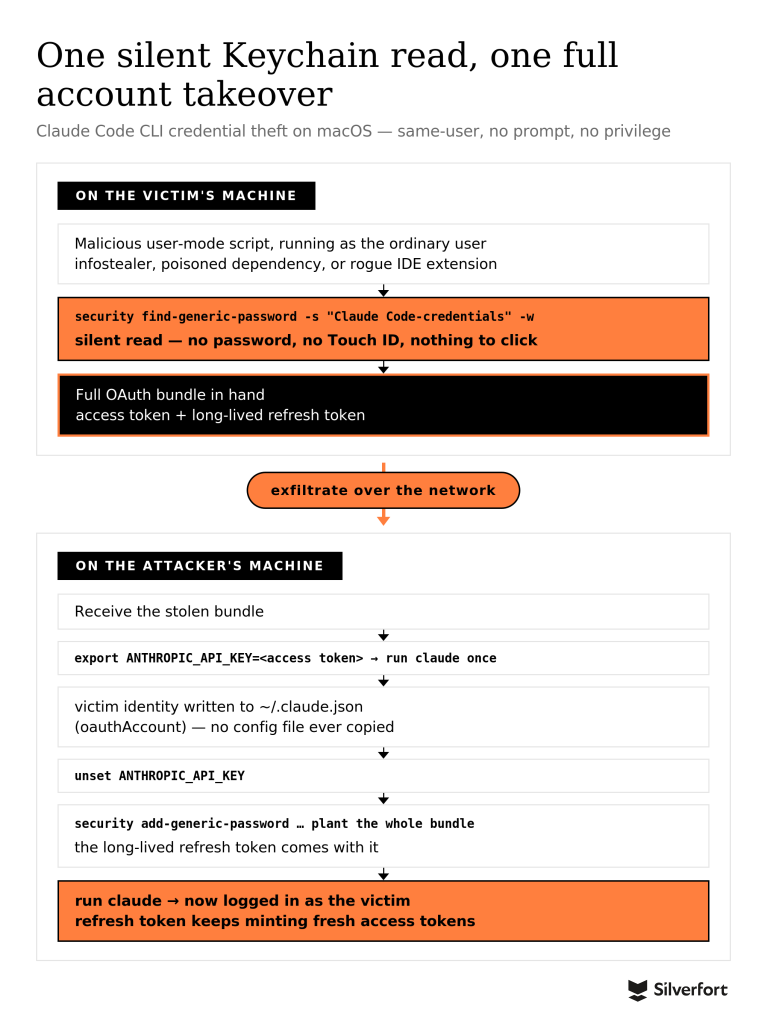
Here is that same flow as a proof-of-concept, running end to end:
Won’t the Claude apps gateway fix this?
Short answer: no. We deployed the gateway, pointed our own Claude Code at it, and ran the exact same theft. It still worked.
It helps to be precise about what the gateway is, because it is narrower than the name suggests. It is not a security layer wrapped around your normal Claude setup. It is a routing tool, a way to point Claude Code at a specific model endpoint an organization runs or chooses, somewhere other than Anthropic’s default path: on-prem, Microsoft Foundry, Amazon Bedrock, Google Cloud, or an Anthropic endpoint of their own. The reasons we saw were the familiar ones: data-residency and compliance rules, a preferred cloud vendor, or a local deployment. If that’s not your organization, the gateway was never part of your setup, and the Keychain item is exposed exactly as the rest of this post describes.
It’s fair to ask what the gateway does buy you, because it isn’t nothing. Developers sign in with corporate SSO, sessions run about an hour, and revocation goes through the IdP, so once an org disables a user, their gateway access dies within a session. The upstream key, the Claude API key or the cloud credential, stays off the laptop. That’s what the announcement means by:
“No long-lived secrets sit on developer machines.”
It pays to read that line for exactly what it says, because it’s about the upstream key, not about theft. What still sits in the Keychain under the gateway is a refresh credential. It may be scoped so that only the gateway will honor it, but that’s the catch: an attacker who lifts it and connects to the gateway as the user can keep minting fresh sessions for as long as that account stays enabled. The one-hour session never bounds the thief. The only thing that stops them is the organization noticing and disabling the user, and nothing about a silent Keychain read makes that happen. “No long-lived secrets” quietly becomes long-lived access for whoever reads the item.
So we set up a gateway, connected Claude to it, and repeated the attack from the last section. The Keychain read didn’t change. The same one-line Python script pulled the credential out with no prompt, and we copied it to a second machine.
This time we didn’t even need the extra bootstrapping from the previous section, and we didn’t need a second file from the victim either. The gateway’s address is already inside the credential we stole. The value stored under the Claude Code-credentials Keychain item holds more than the tokens. It also records the gateway the victim was signed in to, so one silent read hands us both the keys and the address of the door they open.
That means there’s nothing extra to pull off the victim’s disk. We create the config on the attacker’s own machine, at:
/Library/Application Support/ClaudeCode/managed-settings.json
and point it at the gateway URL we just read out of the stolen credential:
{

"forceLoginMethod": "gateway",

"forceLoginGatewayUrl": "https://claude-gateway.internal.example.com"

}
Writing that file is no barrier. Anthropic itself calls managed settings “a client-side control, not a security boundary,” so an attacker is free to author their own. Then we load the stolen credential and start Claude Code. There is no separate step to re-create the victim’s identity. The credential carries the token, the token authenticates to the gateway, and the gateway runs the session as the victim, with the victim’s access.
The gateway does put up one hurdle a purely remote attacker couldn’t clear. Claude Code won’t talk to a gateway on a public address:
“At /login, Claude Code requires the gateway’s hostname or IP address to resolve only to private addresses: RFC 1918, link-local, CGNAT 100.64.0.0/10, IPv6 ULA fc00::/7, or loopback for local development. For a gateway you host, any public address is rejected.”
So the stolen credential only works from somewhere that can reach the private gateway. That reads like a wall until you remember the threat model. We already assume the attacker is running as the user on the victim’s machine, which sits inside that network to begin with. Reaching a private address from there is the easy part. It’s friction, not a boundary.
Here’s the honest scorecard. The gateway is worth having for other reasons. It keeps the upstream key off the laptop, and it gives the organization a central kill switch through the IdP, though that one only helps once someone has noticed the theft. What it doesn’t do is close the weakness this post is about. The credential still lands in the same Keychain item, that item is still readable by any process with no prompt, and a stolen refresh credential keeps working against the gateway until the account is disabled.
The network check is a detour, not a stop. And for the large majority of users, who never touch the gateway at all, nothing here changes.
What should a defender do right away
- macOS: until the item’s ACL is bound to the Claude signature, your detection point is the process, not a file. The signal is a /usr/bin/security find-generic-password call whose service string is Claude Code-credentials and which carries -w to print the secret. Alert on it through process-execution or Endpoint Security telemetry, and use process lineage to cut false positives: legitimate reads trace back to the Claude binary, so baseline those first, while the suspicious ones come from a shell one-liner, an editor or extension host, or a dependency install script. Watch add-generic-password for the same service too, because that is how a stolen bundle gets planted on a second machine. Treat these alerts as a compensating control.
- Linux and Windows: file integrity monitoring and DLP on .credentials.json, permission-drift alerts, and content signatures on the sk-ant-oat and sk-ant-ort prefixes.
- Everywhere: correlate credential-store reads with unexpected outbound traffic, and watch the identity plane for the same token being reused across hosts. Rotate on suspicion. A single read hands over a long-lived refresh token, so a credible read event calls for /logout and re-login, plus Console-key rotation, not just cleaning the endpoint.
- The real fix belongs to Anthropic, and it is low-risk: create the CLI’s Keychain item through the native API, bound to the Claude binary’s own code signature. That is the pattern already shipping in Claude Desktop.
The good news is that the hard part is already solved inside Anthropic’s own codebase. The CLI does not need a new security model. It needs the one already running next door.
Disclosure timeline
June 25, 3:46pm UTC. Researcher submits the report with reproduction steps, impact, and three screenshots.
June 25, 4:05pm UTC. Anthropic closes it as Informative just 19 minutes later, ruling it out of scope under “Local storage of Claude Code credentials, configuration and logs,” and states that same-user processes are fully trusted, so per-process Keychain ACLs add no meaningful boundary.
July 2, 11:12am UTC. Researcher requests a human re-evaluation, argues the close was mapped to the wrong exclusion (this is a Keychain ACL misconfiguration, not local storage, and Desktop gets it right on the same OS), attaches the POC video, and gives notice of a defensive write-up with an offer to coordinate disclosure.
July 2, 11:14am UTC. Anthropic acknowledges the re-evaluation request and says it will review internally, confirms that public discussion is fine since the report is closed, and asks to see a draft in advance.
July 22. Researcher shares the final draft of the blog for pre-publication review, as Anthropic requested, and notes it now includes an analysis of whether the Claude apps gateway does or does not mitigate the flaw.
July 24. Anthropic completes its review, reports no factual concerns or requested corrections, and clears the write-up for publication. Its classification is unchanged: It adds that it is now tracking a tightening of the Keychain item’s access control as a defense-in-depth hardening improvement worth making, even though it does not consider it a vulnerability under its threat model.