
TL;DR
What it is: Device code phishing is An OAuth abuse technique where attackers initiate a legitimate device code authentication flow against Microsoft Entra ID, then trick a user into entering the resulting code at the real login.microsoft.com/devicelogin page—handing the attacker a valid access token without ever capturing a password.
Why it matters: It has gone from nation-state tradecraft (Russia-linked STORM-2372, active since August 2024) to commodity attack kit in under a year. The EvilTokens PhaaS toolkit, surfaced by Microsoft in April 2026, automates the full flow end-to-end—defeating the 15-minute code expiry window and running 10-15 personalized campaigns every 24 hours.
Why it’s hard to detect: There is no fake login page, no typo-squatted domain, no credential capture, and no malicious payload to scan. The only URL involved is login.microsoft.com/devicelogin. MFA completes successfully on the victim’s real device, so every signal an email gateway, EDR, or identity protection product is trained to look for comes back clean.
How it differs from AiTM: Adversary-in-the-Middle attacks proxy a fake login page to steal session cookies. Device code phishing skips the proxy entirely—the victim authenticates on the real Microsoft page, so there is no AiTM infrastructure to detect, block, or take down.
Core detection signal: A successful sign-in where the authentication method is Device code, the resource being accessed is a first-party Microsoft client (e.g., Azure CLI, Microsoft Office), and the sign-in is performed from an anomalous location or by an entity that does not normally authenticate using device codes. Almost no legitimate end-user workflow generates this pattern; for many organizations, every hit warrants investigation.
Immediate response if detected: Revoke the user’s access immediately (refer to Microsoft’s documentation), disable the compromised user, and remove their role assignments. Note that revoking refresh tokens does not invalidate access tokens already issued—those remain valid until they expire. Hunt for malicious activity originating from the suspicious session. Token revocation alone is not enough—the attacker may already have established persistence.
Key policy action: Block the device code flow via Conditional Access for any user population that does not have a documented business need for it. Microsoft’s own guidance now recommends this. Most enterprise users—including most developers—almost never legitimately authenticate this way. Where device code authentication is genuinely required, restrict it to trusted locations via geo-fencing.
What security teams need to know about device code phishing
A nation-state threat actor (STORM-2372, linked to Russian state interests) has been running a device code phishing campaign since August 2024 that targets government agencies, defense contractors, NGOs, telecom, energy, and healthcare organizations worldwide.
This is not a vulnerability that Microsoft can patch—it is a design property of the OAuth 2.0 device code protocol, supported by every major identity provider. The attack bypasses MFA (the victim completes it willingly), leaves no suspicious infrastructure for security tools to flag (the only URL is microsoft.com), and the resulting tokens survive password resets. Conventional email gateways, CASBs, and URL scanners rate the attack link as safe because it is safe—it points to Microsoft’s own login page.
Post-compromise, attackers have been observed registering persistent devices within 10 minutes, mapping organizational structures via Microsoft Graph, filtering for high-value targets (finance, executive, administrative roles), creating hidden inbox rules, and exfiltrating wire transfer details and executive correspondence—the raw material for business email compromise and financial fraud.
The immediate organizational action: block the device code authentication flow via Conditional Access for all users who do not explicitly require it, ensure your incident response playbook includes OAuth token revocation (not just password resets), and deploy token binding for high-value accounts. See Strategic Recommendations below for the full decision framework.
What if the phishing URL is microsoft.com?
Device code phishing is a token theft technique that abuses Microsoft’s implementation of the OAuth device code flow. Unlike most phishing campaigns in the wild, attackers direct the victim to an actual Microsoft URL—not a lookalike domain, not a reverse proxy, not a typosquat. The victim signs into the real Microsoft login page, completes real MFA, and sees a normal success screen. But the authentication tokens—an additional authentication method granting the victim’s privileges—are silently delivered to the attacker on an entirely different machine. No credential theft, no session hijacking, no attacker infrastructure to detect or take down. Just a legitimate OAuth flow doing exactly what it was designed to do, for the wrong party.
It is being exploited at scale today—and although the underlying flaw is in the OAuth standard itself, Entra ID’s implementation is what makes it trivial to weaponize. Microsoft attributed an ongoing campaign to STORM-2372, a threat actor assessed with moderate confidence to align with Russian state interests. The operation has targeted government agencies, defense contractors, NGOs, telecom providers, energy companies, and healthcare organizations across multiple continents since at least August 2024. In April 2026, Microsoft documented a significant escalation: the emergence of EvilTokens, an AI-enabled phishing-as-a-service (PhaaS) toolkit that automates device code abuse end-to-end—generating live codes on demand to defeat the 15-minute expiry window, crafting hyper-personalized lures using generative AI, and running 10 to 15 distinct campaigns every 24 hours. The technique has gone from nation-state tradecraft to commodity attack kit in under a year.
In this blog post, we’ll break down exactly how this attack works at the protocol level, walk through a hands-on simulation with real Entra ID log captures, provide KQL hunt queries you can run in your own environment today, and expand on the detection logic as derived from the logs generated by the attack.
What is the device code flow?
The OAuth 2.0 Device Authorization Grant, defined in RFC 8628 and published in August 2019, is an authentication flow designed for devices that lack a browser or have limited input capabilities—smart TVs, gaming consoles, IoT sensors, digital signage, conference room hardware, and CLI tools like the Azure CLI or AWS CloudShell. Instead of signing in directly on the device, the user is shown a short alphanumeric code and a URL; they open that URL on a separate device (typically a phone or laptop), enter the code, and complete authentication there—including any MFA prompt. Meanwhile, the original device polls the authorization server in the background and receives an access token once the user approves.
The flow is widely supported: Microsoft Entra ID, Google, GitHub, Okta, and most major identity providers implement it, and it is the default sign-in method for Azure CLI (`az login`). While it is not the most common OAuth flow in everyday web applications, it is the standard mechanism for headless and input-constrained environments and is actively used across enterprise tooling, DevOps pipelines, and consumer streaming platforms.
The design risks are inherent to the standard, but Entra ID’s implementation amplifies them—which is why every in-the-wild phishing kit targets Microsoft. Microsoft itself now recommends blocking the flow via Conditional Access wherever it is not explicitly needed.
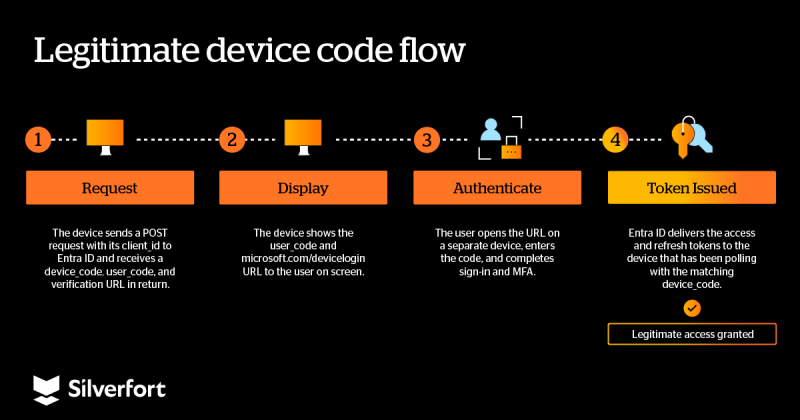
The critical design flaw: the device_code is the only link between the polling device and the authenticating user. Microsoft does not verify that the polling device is the one the user intended to authorize. It checks no device identity, no network location, no trust posture. Whoever has the code and is polling for it gets the tokens.
Attack analysis
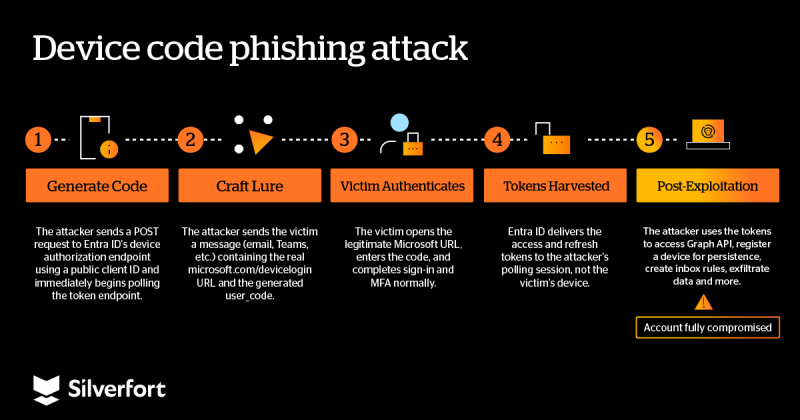
The convenience that makes the device code flow useful is exactly what makes it exploitable. Because the protocol never ties the polling device to the authenticating user directly, an attacker who obtains a valid device code can silently harvest the resulting access, and refresh tokens the moment a victim completes sign-in. No phishing infrastructure, no credential interception, no MFA bypass—just a legitimate Microsoft login page doing exactly what it was designed to do, on behalf of the wrong party.
How attackers weaponize this flow
Microsoft’s device code endpoint is open by design—no client secret, no device registration, no proof of possession.
An attacker sends a single unauthenticated POST using a well-known Microsoft client ID (the Azure CLI, Microsoft Office, or any other first-party public client—these IDs are public, trivially enumerable, and impossible for Microsoft to revoke without breaking legitimate tooling that depends on them) and instantly receives a valid device code. These first-party client IDs are the attacker’s gift: trusted by default, pre-consented to broad scopes, and permanently available. The Tenant ID can be easily obtained once an attacker identifies the target victim domain.
curl -X POST https://login.microsoftonline.com/<tenant-id>/oauth2/v2.0/devicecode \
  -d "client_id=04b07795-8ddb-461a-bbee-02f9e1bf7b46&scope=https://management.azure.com/.default"
The attacker wraps the verification URL and user code into a convincing lure—a Teams meeting invite, a document-sharing notification, an IT security alert—and delivers it via email, Teams, WhatsApp, Signal or other means. STORM-2372 was specifically observed spoofing Teams meeting notifications and WhatsApp group invitations. While the victim reads the email, the attacker’s script is already polling. The moment the victim completes authentication, the polling loop receives the full token pair.
Why existing security controls fail
What makes device code phishing uniquely dangerous is the number of conventional defenses it neutralizes simultaneously:
As far as Microsoft’s identity platform is concerned, this was a completely legitimate sign-in.
- MFA is co-opted, not bypassed. The victim completes MFA normally. The resulting token carries mfaAuthenticated=true.
- No attacker infrastructure to detect. The only URL in the attack chain is microsoft.com—it has a perfect reputation on every threat intel feed and a valid EV certificate. Your email gateway, CASB, URL sandbox, and proxy safe-link rewriting all inspect it and return: safe.
- Refresh tokens survive password resets. Unlike session cookies (which AiTM attacks steal), OAuth refresh tokens are designed for long-term, cross-device access. They can be silently exchanged for new access tokens without user interaction or MFA re-prompts. Resetting the victim’s password does not revoke them—the attacker keeps access unless the tokens are explicitly revoked.
- Forensic footprint is minimal. Sign-in logs show a successful login with Risk Level = None and MFA = Success. There are no multiple failed logins, no credential changes, no suspicious object creation. The only potential signal is a non-interactive token refresh from an unexpected IP—and only if you’re specifically monitoring for it.
Important: This is not an adversary-in-the-middle (AiTM) attack. AiTM tools like EvilProxy intercept sessions through a reverse proxy, capturing cookies after MFA. That requires attacker-controlled infrastructure—domains, certificates, active servers—all of which leave a forensic trail. Device code phishing requires a single HTTP POST and a convincing email. The tokens it yields are longer-lived and more broadly scoped than session cookies, and there is zero attacker infrastructure to investigate or take down.
Attacker perspective: Step-by-step flow
To demonstrate the full attack chain, we reproduced it in a controlled lab environment using a dedicated research tenant (glich.net). The simulation models an adversary operating as helpdesk@glich.net targeting the user roni@glich.net with a device code phishing lure disguised as a credential verification request.
Phase 1: Generating the device code
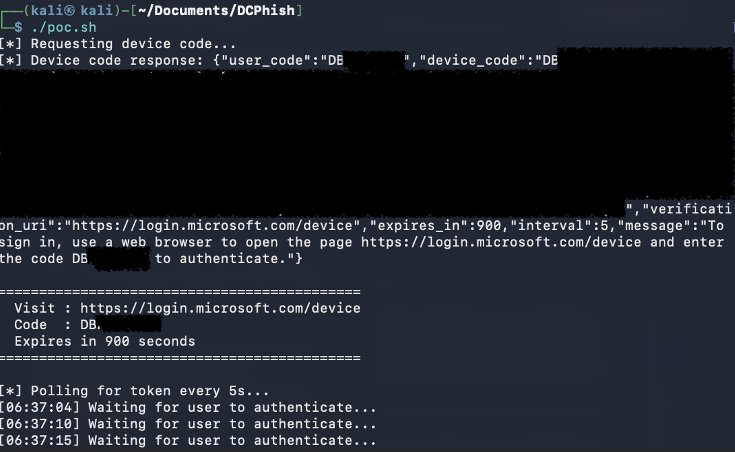
The attacker sends a POST to Entra ID’s device authorization endpoint using the Azure CLI’s public client ID, receives a device code and user code, and starts polling the token endpoint immediately.
Phase 2: Crafting and delivering the phishing lure
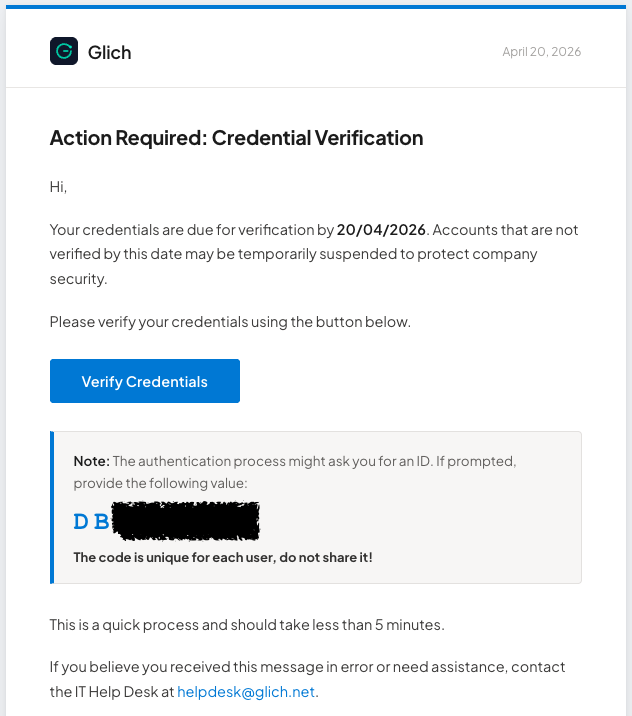
The attacker wraps the device code and the login.microsoft.com/devicelogin URL into an urgent-sounding email—disguised as a Teams meeting invite, a credential verification request, or an IT security alert.
Phase 3: User approval
The user receives the email and grants access to the attacker.
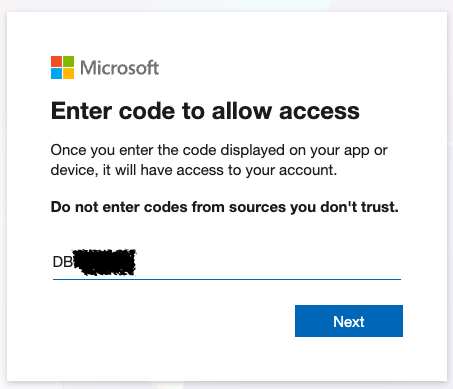
When the victim provides the code and credentials in their browser, the polling loop picks up the tokens.

Phase 4: Post-exploitation
With a valid access token and a long-lived refresh token in hand, the attacker has authenticated access to the victim’s Microsoft 365 environment—and the clock is ticking. Microsoft’s April 2026 analysis of an AI-enabled device code phishing campaign (a direct evolution of the STORM-2372 activity first reported in February 2025) documented the post-compromise playbook that threat actors are running in the wild. The progression follows a consistent pattern:
Device Registration for Persistence
In some cases, within 10 minutes of the initial breach, threat actors registered new devices under the compromised account to generate a Primary Refresh Token (PRT). A PRT provides long-term, SSO-capable access that survives individual token revocations—effectively giving the attacker a persistent foothold that is significantly harder to detect and remediate than a stolen refresh token alone.
Microsoft Graph Reconnaissance
Using the stolen tokens, attackers queried the Microsoft Graph API to programmatically map internal organizational structures, user roles, and permission assignments. This automated reconnaissance allowed them to rapidly identify which compromised accounts had access to sensitive resources and where privilege escalation was possible.
High-Value Target Filtering
Rather than exploiting every compromised account indiscriminately, threat actors filtered the pool of victims for high-value personas—specifically individuals in financial, executive, or administrative roles. This selective approach concentrated the most invasive post-compromise activity on accounts with the highest potential payoff.
Malicious Inbox Rules for Persistence
For selected targets, threat actors created inbox rules using the Microsoft Office application to redirect, hide, or delete incoming emails. These rules served a dual purpose: maintaining persistent access to email communications without repeated logins, and concealing evidence of the compromise from the victim (e.g., auto-deleting security alerts or password reset notifications).
Targeted Email Exfiltration
The most invasive activity was reserved for users with financial authority. Threat actors performed deep-dive searches of email communications, specifically targeting wire transfer details, pending invoices, and executive correspondence—the raw material for business email compromise (BEC) and financial fraud.
Delayed Execution to Evade Detection
Not all threat actors moved immediately. In several observed cases, attackers waited hours after the initial compromise before taking any post-exploitation action—a deliberate evasion technique designed to separate the suspicious authentication event from the malicious activity in the logs, making temporal correlation harder for defenders. By the time the malicious activity begins, the authentication event that enabled it has already aged out of short-term triage queues and real-time alerting windows. Defenders reviewing a suspicious sign-in at T+0 may find no follow-on activity and close it as benign—only for the attacker to begin exfiltration hours later, when the original alert is no longer on anyone’s screen. This deliberate gap between access and action is what makes device code phishing particularly resilient to time-based detection: the breach and the impact never appear in the same investigation window unless defenders are explicitly correlating across extended timeframes.
Defender perspective: What we should look for in the logs
For threat hunters and SOC analysts—real Entra ID log captures showing exactly what to look for.
We captured Entra ID sign-in log entries generated by this flow. The attacker’s polling requests—the repeated authorization_pending responses—are not logged at all. Only the successful token issuance generates entries, split across two tabs:
| Log tab | What it captures |
| Interactive sign-ins | The user’s browser session approving the code at microsoft.com/devicelogin |
| Non-interactive sign-ins | The token being handed to the polling client after approval |
Entry 1: Interactive (Browser/Victim side)
The victim visited microsoft.com/devicelogin and approved the code. MFA was satisfied by a prior session claim—the victim saw zero friction beyond clicking “approve.”
| Field | Value |
| Time | 2026-04-23T12:40:47Z |
| Correlation ID | 1a8f9d0a-6d23-4419-a364-6324a38ba857 |
| User | roni@glich.net |
| Application | Microsoft Azure CLI (04b07795-…) |
| Auth protocol | Device code |
| Transfer method | Device code flow |
| MFA | Satisfied by claim in the token |
| Token protection | Unknown (1002) |
| User agent | Chrome 147 / Mac |
Entry 2: Non-interactive (Polling client/Attacker side)
| Field | Value |
| Time | 2026-04-23T12:40:51Z (+4 seconds) |
| Correlation ID | 1a8f9d0a-6d23-4419-a364-6324a38ba857 |
| User | roni@glich.net |
| Application | Microsoft Azure CLI (04b07795-…) |
| Auth protocol | None |
| Transfer method | Device code flow |
| MFA | Satisfied by claim in the token |
| Token protection | Unbound (1002) |
| User agent | curl/8.18.0 |
Side-by-side comparison
| Field | Entry 1 (Browser) | Entry 2 (Polling client) |
| Time | 12:40:47Z | 12:40:51Z (+4s) |
| Sign-in type | Interactive | Non-interactive |
| Auth protocol | Device code | None |
| Transfer method | Device code flow | Device code flow |
| Token protection | Unknown (1002) | Unbound (1002) |
| User agent | Chrome 147 / Mac | curl/8.18.0 |
| Correlation ID | 1a8f9d0a-… | 1a8f9d0a-… |
The detection primitive is clear: both entries share a Correlation ID, but the user agent and potentially the IP address are different. The browser leg shows Chrome on Mac; the polling leg shows curl. In a real attack, this log pair with these differences—especially a geographic split indicative of potential impossible travel or a suspicious source—is the core signal to build alerting around.
Enriching the polling-side IP against threat intelligence feeds, IP reputation lists, suspicious user agent values (such as the “curl” example in the logs) and ASN metadata strengthens detection further: attacker infrastructure frequently originates from hosting providers, commercial VPNs, or ASNs with no legitimate presence in your user population. A polling IP that resolves to a known-bad ASN or appears on a blacklist is a high-confidence indicator even without an IP mismatch between legs.
Detecting device code phishing in your environment
For threat hunters: copy-paste KQL queries for Azure Monitor, Microsoft Sentinel, or any KQL-compatible SIEM.
The following KQL queries can be used to hunt for device code phishing activity in your Entra ID sign-in logs. These are designed to be copy-paste ready for Azure Monitor, Microsoft Sentinel, or any KQL-compatible SIEM.
The goal is to catch device code abuse as close to T+0 as possible. Each query below targets a different signal: abnormal device code usage patterns, IP or user-agent mismatches between the interactive and polling legs, and high-volume code generation that may indicate an active campaign.
1. Surface all device code flow events for correlation analysis
This query retrieves both legs (interactive and non-interactive) of every device code flow. Sort or join by CorrelationId to compare them side by side and look for IP or user-agent mismatches—the core detection signal.
SigninLogs
| where AuthenticationProtocol == "deviceCode"
    or OriginalTransferMethod == "deviceCodeFlow"
| project CorrelationId, UserPrincipalName, IPAddress, UserAgent,
          IsInteractive, TimeGenerated, AppDisplayName,
          AuthenticationProtocol
| order by CorrelationId, TimeGenerated asc
2. Detect device code flows with IP address mismatch between legs
This query joins the interactive and non-interactive entries of each device code flow by CorrelationId and flags flows where the IP addresses differ—a strong indicator that the polling client is not the same device or location as the authenticating browser. For higher-fidelity alerting, enrich the polling IP with ASN lookups and threat intelligence feeds—flag flows where the polling IP belongs to a hosting provider, commercial VPN, or a blacklisted range, even if the IPs are in the same country.
let interactive = SigninLogs
| where AuthenticationProtocol == "deviceCode"
    and IsInteractive == true
| project CorrelationId, UserPrincipalName, BrowserIP = IPAddress,
          BrowserUA = UserAgent, TimeGenerated;
let polling = AADNonInteractiveUserSignInLogs
| join kind=inner interactive on CorrelationId
| project CorrelationId, PollingIP = IPAddress, PollingUA = UserAgent;
interactive
| join kind=inner polling on CorrelationId
//| where BrowserIP != PollingIP
| project TimeGenerated, UserPrincipalName, BrowserIP, BrowserUA,
          PollingIP, PollingUA, CorrelationId
3. Monitor for high-volume device code generation from a single application
An attacker running a device code phishing campaign generates many codes in a short window. This query surfaces applications with an unusually high number of device code flows across distinct users in the past 24 hours.
SigninLogs
| where TimeGenerated > ago(24h)
| where AuthenticationProtocol == "deviceCode"
    or OriginalTransferMethod == "deviceCodeFlow"
| summarize DistinctUsers = dcount(UserPrincipalName),
            FlowCount = count()
    by AppDisplayName, AppId
| where DistinctUsers > 3  // adjust threshold to your environment
| order by DistinctUsers desc
Adjust the thresholds and time windows to match your environment’s baseline. Organizations that legitimately use device code flows (e.g., for Azure CLI or IoT device onboarding) should establish a known-good list of client IDs and exclude them.
A suspicious log pair was found—now what?
Not every successful device code flow with a user-agent mismatch is malicious—legitimate scenarios exist (e.g., a developer running az login on a remote server and authenticating from their laptop). Investigate before escalating. However, if the log pair shows hallmarks of abuse—an unfamiliar polling IP, a hosting-provider ASN, a user who did not initiate a device code flow—treat it as a confirmed token theft and execute the following steps immediately:
1. Revoke all refresh tokens immediately
Revoke the user’s access immediately (refer to Microsoft’s documentation), disable the compromised user, and remove their role assignments. This invalidates every active refresh token and cuts off the attacker’s ability to silently obtain new access tokens. Do this before resetting the password—a password reset alone does not revoke OAuth refresh tokens.
2. Terminate active sessions
Revoking refresh tokens does not invalidate access tokens already issued—those remain valid until they expire. If your tenant uses Continuous Access Evaluation (CAE), force a re-evaluation of all active sessions for the user to flush cached tokens. For non-CAE workloads, revoke the user’s sessions in Entra ID (Users → Revoke sessions) to invalidate any cached tokens across Microsoft 365 services.
3. Check for persistence mechanisms
Hunt for newly registered devices, inbox rules, OAuth app consents, and any other actions performed in the same session. Pay particular attention to device registrations (which generate Primary Refresh Tokens), inbox rules that forward, redirect, or delete mail, and changes to authentication methods (e.g., a new phone number added for MFA). Token revocation alone is not enough—the attacker may already have established persistence; remove anything the user does not recognize.
4. Contain lateral movement
If the compromised user holds privileged roles (Global Admin, Exchange Admin, etc.) or has access to sensitive resources, restrict the account via Conditional Access while the investigation proceeds. Check whether the attacker used the stolen tokens to access SharePoint, Teams, or Azure resources—the Unified Audit Log and Microsoft Graph activity logs will show the scope of access.
5. Preserve evidence and alert the SOC
Export the relevant sign-in log entries (both interactive and non-interactive legs, linked by Correlation ID), the user’s recent audit log activity, and any inbox rules or device registrations you removed. These artifacts are critical for determining the blast radius and for any downstream incident-reporting requirements.
Recommendations and best practices
Strategic recommendations
For executives and security leaders—the policy decisions that matter most.
- Block the device code authentication flow for all users who do not explicitly require it. This is a Conditional Access policy change that eliminates the attack surface entirely for most of your workforce.
- Update your incident response playbook to include OAuth token revocation as a mandatory step alongside password resets. A password reset alone does not revoke refresh tokens—the attacker retains access indefinitely unless tokens are explicitly revoked.
- Prioritize token binding (token protection) for high-value accounts—executives, finance, administrators. This is generally available on Windows (preview on iOS/macOS) and is the strongest defense-in-depth control against token replay from stolen device code flows.
- Audit which applications in your tenant have device code flow enabled. Many organizations have OAuth apps with device code permissions that were never intentionally configured. Reducing the surface is a quick win.
- Ensure your security operations team is monitoring non-interactive sign-in logs—not just interactive ones. The attacker’s token refresh activity appears only in non-interactive logs, which many SOCs do not routinely review.
Tactical recommendations
For security engineers and administrators—implementation-level guidance:
Restrict or block the device code flow via Conditional Access
If your organization does not rely on device code authentication for legitimate use cases (CLI tools, IoT devices, conference room hardware), block the flow entirely using Conditional Access policies. In Entra ID, create a policy that targets All users → Target resources → All Resources (formerly cloud apps) → Conditions → Authentication flows → Device code flow = Block. If some teams need it, scope the allow policy to specific users or groups and known device platforms only, while sticking to the principle of least privilege.
Dictate relevant steps to mitigate token theft
Password resets alone do not revoke OAuth refresh tokens. Your response steps for a compromised account must include: (1) revoking the user’s access and disabling the account, (2) re-evaluating all active Continuous Access Evaluation (CAE) sessions, and (3) reviewing the user’s OAuth app consents and removing any unfamiliar service principals. Without these steps, the attacker retains access via the refresh token until it expires—up to 90 days for a default Entra ID configuration.
Monitor non-interactive sign-in logs for geographic anomalies
The non-interactive sign-in tab in Entra ID is where token refresh events appear. An attacker using a stolen refresh token will generate non-interactive sign-ins from an IP address and user agent that most likely differ from the user’s baseline. Set up alerting on non-interactive sign-ins where the source IP is in a different country or ASN than the user’s last interactive login. Go further by cross-referencing the source IP against threat intelligence feeds and IP reputation databases—polling or refresh activity from blacklisted IPs, known bulletproof hosting providers, or residential proxy networks is a high-confidence indicator regardless of geography. This combination of geographic anomaly detection and reputation-based filtering is the earliest and most reliable signal for device code token theft.
How to defend against device code phishing
Device code phishing represents a fundamental shift in the identity threat landscape—one where the attacker needs no infrastructure, MFA is co-opted rather than bypassed, and access persists through password resets. The attack works precisely because it is legitimate: a real Microsoft login page, a real MFA prompt, a real success screen. The tokens just go to the wrong machine.
The strategic response is straightforward: block the device code flow where it is not needed, ensure your IR playbooks include token revocation, and monitor the non-interactive sign-in logs that most organizations overlook. The technical deep dive in this post—from protocol analysis to log captures to KQL queries—gives your security team everything needed to hunt for this activity today.
As OAuth-based identity attacks continue to evolve, the gap between what traditional perimeter tools can see and what happens at the identity layer will only widen. Organizations that invest in protocol-level detection and response—not just endpoint and network monitoring—will be the ones that catch the next evolution of this technique before it reaches the post-exploitation phase.
Silverfort’s research team continues to track the evolution of OAuth-based attack techniques.