The click that could save you
What if the most overlooked click in your security stack—a user denying an MFA prompt—was actually your best early warning sign of a real attack?
Silverfort’s “User Denied Suspicious Authentication” detection turns that denial into a high-fidelity incident by correlating it with additional suspicious behavior. This blog explores how this unique combination of user response and behavioral analytics can transform identity protection and detection.
The modern problem: From MFA fatigue to behavioral insight
Multi-factor authentication (MFA) is often seen as the final line of defense. But attackers have adapted, exploiting stolen credentials, token reuse, or social engineering to test access—even in environments where MFA is enforced.
At the same time, users experience MFA fatigue, leading them to ignore, delay, or even mistakenly approve prompts. But what happens when a user actively denies a prompt?
That denial, especially when combined with behavioral anomalies like logins from new locations, new devices, or unusual access patterns—becomes a powerful detection signal.
Silverfort’s ability to correlate these factors transforms a simple MFA rejection into a high-confidence indicator of suspicious activity. It shifts MFA from being just a prevention tool to a detection source that provides early warning of compromise.
How it works: When MFA denials become signals
Not every denied MFA prompt is suspicious—users sometimes misclick or genuinely weren’t expecting a login. But when that denial happens alongside abnormal behavior, it’s often the smoke that points to fire.
Silverfort’s “User Denied Suspicious Authentication” incident is triggered when a denied MFA is correlated with other risk indicators tied to the same authentication.
For example:
- If the login originates from a device the user has never used before, and they deny the MFA prompt—it raises questions.
- If the login location shows up in a different geography than the user’s typical behavior, and they deny—that’s not just noise.
- If a denial follows an access pattern that matches enumeration or probing, it may indicate an adversary testing access.
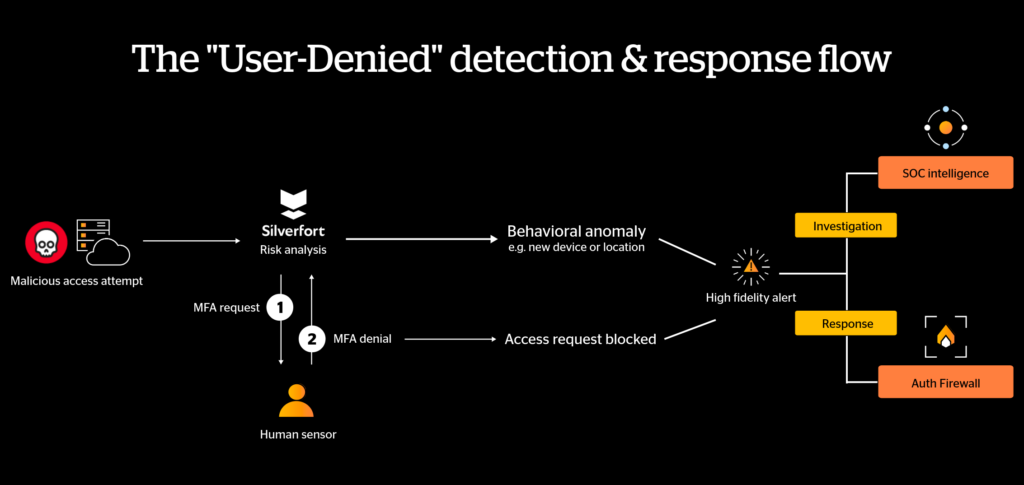
By combining user-generated signals with real-time behavioral analytics, Silverfort produces threat detections that are both precise and actionable.
Real-world example: A denial worth investigating
Imagine this:
- A login request comes from a host not previously associated with the user.
- Silverfort identifies the behavioral anomaly that violates the customer’s policy and enforces MFA.
- The user sees the prompt—and immediately denies it.
Inside the Silverfort platform, this isn’t just another log entry; it’s a high-fidelity incident. When a user denies a suspicious MFA prompt, Silverfort’s console displays a “User Denied Suspicious Authentication” incident alert, enriched with context about the new host, login pattern, and timing.
Security teams can immediately triage the alert, understanding whether this is a sign of a compromised session or a benign false alarm. In either case, the signal is strong, and the context is rich—empowering faster, smarter decisions.
A high-fidelity incident was triggered… what’s next?
The alert is just the beginning of your response, not the end. Once Silverfort flags a “User Denied” incident, the access attempt is blocked—the door is basically slammed for this specific attempt. Now the SOC teams should follow this 3-step investigation and response workflow to make sure the attacker can’t enter through the door.
1. Immediate steps: Assume compromise & block additional doors
Don’t just watch the alert—act on it.
- Activate the Authentication Firewall: You can instantly block that identity from sensitive resources or require step-up MFA for all subsequent attempts until the threat is cleared.
- Neutralize the “Key”: Because the user denied the prompt, you know the attacker already has the password. Trigger an immediate password reset and check your Identity Provider (IdP) logs for other failed logins that might signal a credential stuffing campaign.
2. Forensic investigation: Connecting the dots
Now that the immediate threat is paused, look at the “Who, Where, and How.”
- Audit the Timeline: Look at the user’s authentication history over the last 24–72 hours. Were there other denied prompts? Successful logins from the same suspicious host? Any lateral movement attempts?
- Investigate the Source Host: If the login came from an unrecognized device, see if that host appears in other authentication events across your environment. A compromised machine rarely attacks just one account.
- Check User Risk: Was this user already in a high-risk segment? Consider escalating their policy permanently or blocking specific high-risk access paths until the investigation is complete.
3. Ecosystem correlation: Seeing the full picture
- Correlate with SIEM/XDR: Feed this high-fidelity alert into your SIEM or XDR via Silverfort’s native integrations. Correlating a denied MFA with endpoint signals (like a phishing email or a suspicious process on the same machine) transforms a lone anomaly into a confirmed attack and helps you visualize the full chain.
- Close the Feedback Loop: Don’t investigate in a vacuum. A quick “Did you just deny an MFA prompt?” check with the user takes 30 seconds and can either confirm the threat or clear the alert. Users are your best first-party intelligence source.
Listen when users say no—then act
MFA denials aren’t user friction. They’re a real-time signal that someone just tried to walk through a door that doesn’t belong to them—and your user slammed it.
Silverfort’s “User Denied Suspicious Authentication” detection doesn’t just log that moment. It enriches it: the anomalous host, the unexpected geography, the timing, the behavioral context. By the time your SOC sees the alert, the heavy lifting is already done.
The attacker was stopped at the door. Now you need to find out how they got the key.
Ready to go beyond MFA? MFA denials are just one piece of a robust Identity Threat Detection and Response (ITDR) strategy. To learn how to eliminate identity blind spots and stop attacks before they unfold, download our latest resource: A Practical Guide to Identity Threat Detection and Response (ITDR).