RC4 is a legacy encryption algorithm that Kerberos has relied on for decades to secure authentication traffic in Active Directory (AD) environments. That’s about to change—whether your environment is ready or not.
As part of the security hardening tied to CVE-2026-20833, Microsoft is phasing out RC4 encryption in Kerberos authentication. The April 2026 Windows update marks the first phase where Kerberos Key Distribution Center (KDC) stops accepting RC4 as an implicit fallback. Environments that haven’t mapped up their RC4 dependencies are about to discover them in the worst possible way—through authentication failures in production.
The security community has long established that RC4 encryption is weak. The hard part is knowing where it’s still hiding in your environment. It’s cryptographically outdated, a well-documented attack surface, and kept alive only for backwards compatibility with legacy systems. RC4 has persisted in AD environments far longer than anyone intended.
In this blog, we’ll walk through why RC4 dependencies are so difficult to detect, what’s at risk if they go unnoticed, and how Silverfort gives security teams the visibility to find and remediate them before enforcement does it for you.
Why RC4 in Kerberos is a critical security gap
To understand why RC4 deprecation matters, it helps to quickly recap how Kerberos authentication works. When a user or service account authenticates in an AD environment, the Kerberos KDC issues a ticket—essentially a cryptographically protected pass that grants access to a specific resource. The encryption algorithm used to protect that ticket determines how difficult it is for an attacker to crack it.
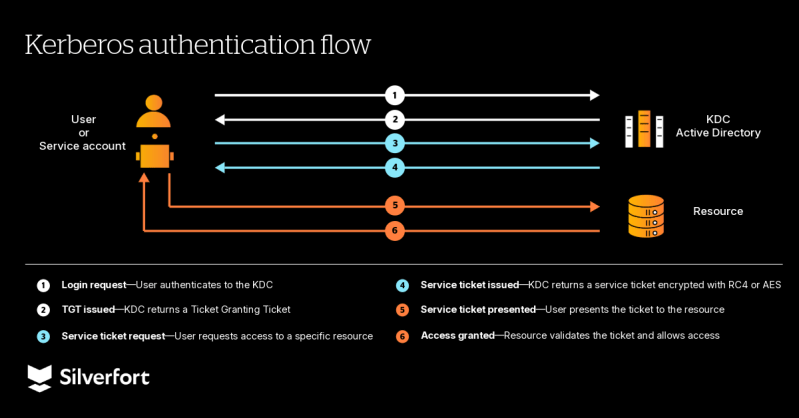
This is where RC4 creates a real exposure. When Kerberos tickets are encrypted with RC4, they become exposed to an attack known as Kerberoasting. In this type of attack, a threat actor with any valid domain account can request a service ticket for a legitimate resource, capture it, and take it offline for brute-force cracking—with no elevated privileges required, and no alerts triggered. The weaker the encryption, the faster the crack.
With RC4, that process is significantly faster compared to Advanced Encryption Standard (AES) encryption, especially for service accounts with older or weaker passwords. The result is a straightforward path from a basic domain account to full service account compromise—and from there, lateral movement across the entire environment.
Modernize your AD Security
Learn how to prevent lateral movement and privilege escalation abuse in Active Directory (AD).
Why RC4 dependencies are hard to find
If RC4 is a well-known risk, why do so many environments still have dependencies on it? The answer isn’t negligence—it’s visibility. RC4 exposure often doesn’t appear on its own. It can run quietly in the background, often in places that haven’t been touched in years.
The main reason is a single AD attribute: msDS-SupportedEncryptionTypes. When this attribute is not explicitly set on an account, the KDC has no instruction on which encryption to use—and historically, that meant RC4, AES-128, or AES-256 were all permitted. Most environments have thousands of accounts where this attribute is simply undefined—and each one of them is a potential target for Kerberoasting and compromise.
There are two account types that are particularly at risk: service accounts and machine accounts.
Service accounts in Active Directory: The biggest blind spot for RC4
Service accounts are user-type accounts created to run applications, services, or automated processes. Unlike regular user accounts, their passwords are managed manually—and in many environments, they haven’t been reset in years.
If a service account’s password was last set before Windows Server 2008—the version that introduced AES encryption support in AD—that account never had AES keys generated for it. Upgrading the domain alone doesn’t fix it. Only a password reset triggers AES key generation instead of RC4. But before you can do that, you need to know which accounts are in this state—and that’s where most environments have no visibility.
Machine accounts in Active Directory: A different kind of dependency
Machine accounts are automatically created by Active Directory for every endpoint that joins the domain. Unlike service accounts, their passwords rotate automatically—so stale credentials aren’t the issue here.
The problem is the operating system itself. Devices running Windows versions older than Server 2008 don’t support AES encryption. For these accounts, RC4 isn’t just a default option—it’s a hard requirement until the system is upgraded.
The result is that RC4 exposure in most environments isn’t concentrated in one place. It’s spread across service and machine accounts—each with a different reason for the dependency and a different remediation path.
RC4 deprecation timeline: What happens at each phase and why it matters now
Microsoft has structured the RC4 deprecation as a phased rollout, which gives organizations some time to prepare—but that time is running out.
The January 2026 update introduced the audit phase. RC4 encryption was still permitted, but new logging mechanisms were added to give organizations visibility into where it was being used.
The April 2026 update is where enforcement begins. The Key Distribution Center (KDC) now operates in AES-only mode by default for accounts where msDS-SupportedEncryptionTypes is undefined. RC4 is no longer a fallback option, and any service or machine account that still depends on it will start experiencing authentication failures. A temporary solution exists: the RC4DefaultDisablementPhase registry key allows administrators to manually roll back DC behavior while they complete remediation. But this is explicitly a short-term option.
In July 2026, the rollback option will be removed completely. RC4 encryption will only work if it is explicitly configured on individual accounts, but Microsoft doesn’t recommend following this insecure approach. Without a fully completed remediation process, any remaining RC4 dependencies will cause authentication failures with no way to roll back.
The risk isn’t just in authentication failures. Service accounts that can’t authenticate mean applications go down, and automated processes stop—an operational problem that can lead to business-wide disruption. And any RC4 dependencies that remain explicitly configured after July become a permanent weak point in your Kerberos authentication.
How to find RC4 exposure in your environment with Silverfort
Silverfort helps identify RC4 dependencies in your environment through two complimentary approaches: proactive posture assessment and real time authentication monitoring—without any additional configuration or scripting.
The investigation follows a natural two-step flow: start with risk indicators to proactively identify accounts and devices most likely to carry RC4 dependencies, then drill into authentication logs to confirm which ones are specifically using RC4 in real time authentication flows.
Step 1—Risk indicators: Identify accounts with weak encryption exposure
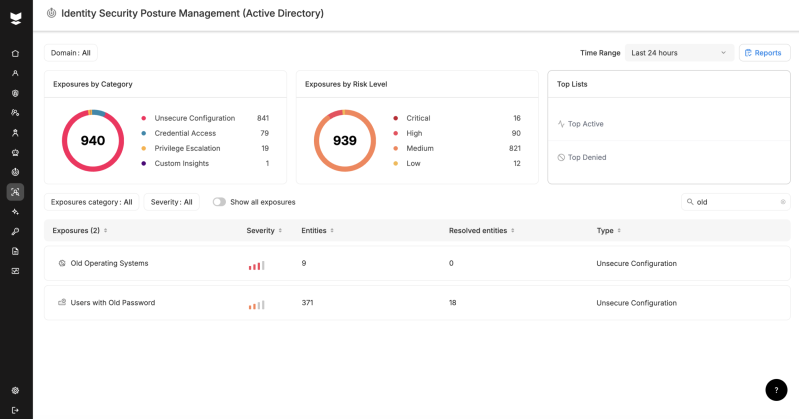
Silverfort’s Identity Security Posture Management (ISPM) continuously monitors your environment and automatically raises risk indicators when weak encryption is detected in authentication traffic. Two indicators are directly relevant to RC4 exposure:
- Weak Encryption (Users)—raised when a user account authenticates using RC4 or other weak Kerberos encryption types
- Weak Encryption (Servers)—raised when the same is observed for service or machine accounts
These indicators give you an immediate, actionable list of accounts where weak encryption has actually been identified in authentication traffic—not just accounts that might be at risk based on configuration, but accounts where weak encryption is actively being used right now.
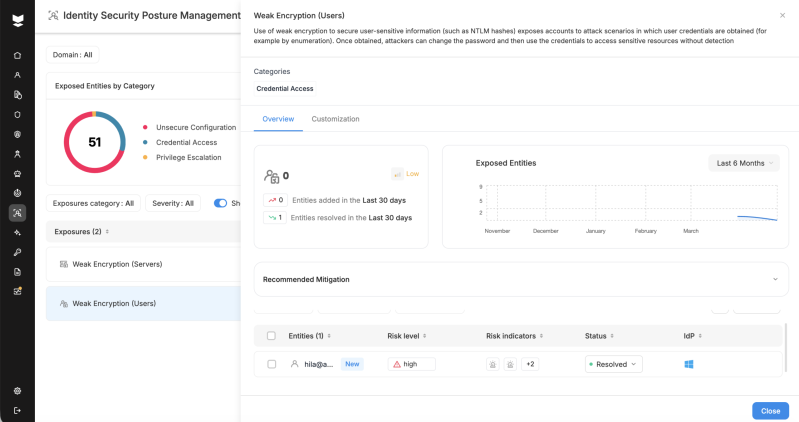
Beyond the weak encryption indicators, two additional ISPM categories help complete the picture. Users with Old Passwords identifies service accounts most likely to be carrying RC4-only keys—because their passwords predate Windows Server 2008 and AES keys were never generated. Old Operating Systems surfaces devices that don’t support AES encryption, giving you a clear view of which machine accounts need manual RC4 exceptions configured or a decommission plan in place before enforcement hits.
Step 2—Authentication logs: Confirm and investigate RC4 usage
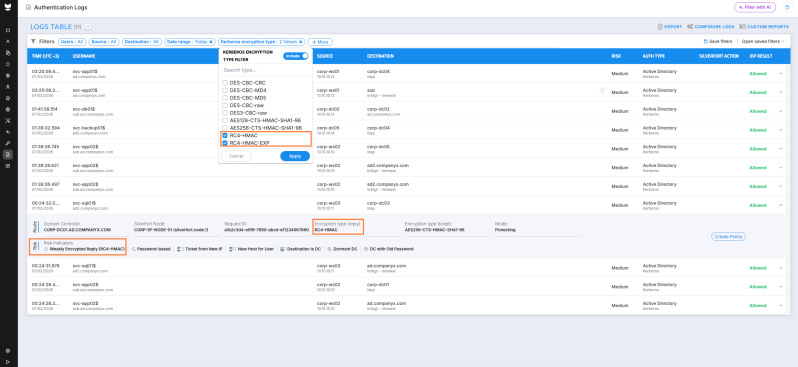
Once you have your list of flagged accounts, Silverfort’s Authentication Logs let you go deeper (note: you can learn more about getting identity visibility and intelligence here). Filter by Kerberos encryption type—specifically RC4-HMAC or RC4-HMAC-EXP—to get per-authentication visibility into exactly where RC4 is being used. Unlike the broad weak encryption indicators in Step 1, this filter gives you RC4-specific confirmation for each authentication event. For each authentication, you can see:
- The user or service account involved
- The source host
- The target service or SPN
- The domain controller that issued the ticket
This gives you the precise context needed to confirm which accounts are specifically using RC4 encryption, to prioritize remediation, and to have an informed decision-making process with the teams responsible for the affected systems.
Don’t wait for Microsoft to find your RC4 exposure for you
Silverfort gives you the visibility to find RC4 dependencies before Microsoft’s enforcement does it for you—resulting in authentication failures and lost productivity. And, with Silverfort’s continuous monitoring, you can track your progress as you remediate them. With the July 2026 deadline approaching, there’s no better time to find out where you stand.
Not sure where to start? Download our RC4 Remediation Readiness Checklist to assess your exposure and prioritize your next steps.
Want to go deeper? Watch our on-demand webinar where Silverfort’s Security Research Team Lead Dor Segal walks through the RC4 attack path live—including a product demo of how Silverfort surfaces RC4 dependencies in real environments.
And, if you’d like to see how Silverfort can help you with your specific environment, schedule a call with one of our experts.