
TL;DR
The Microsoft Agent Identity Platform (Preview) gives AI agents their own identities in Entra ID (blueprints, agent identities, agent users) so you can govern and secure them like any other principal. To manage that new control plane, Microsoft introduced the Agent ID Administrator role. On paper, it’s scoped to agent-related objects only.
We discovered that accounts with only the Agent ID Administrator role could take over arbitrary service principals – including ones that have nothing to do with agent identities – by becoming owner, then adding credentials and authenticating as that principal. That’s full service principal takeover. In tenants where high-privileged service principals exist, it becomes a privilege escalation path.
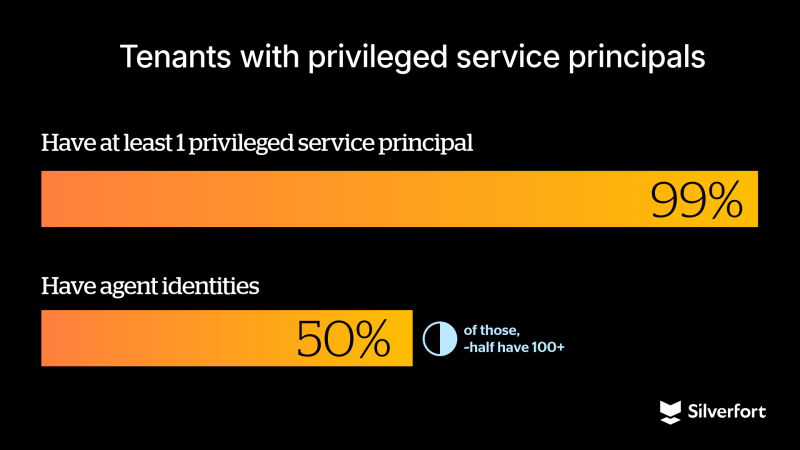
While the Agent ID Administrator role isn’t yet widely used, most tenants have at least one privileged service principal. We also observed that many tenants already use agent identities, sometimes at significant scale. As adoption of the Agent ID Administrator role grows, this scope gap could become a meaningful identity security risk.
We disclosed this behavior to Microsoft Security Response Center (MSRC), and it was fixed in every cloud. The Agent ID Administrator role can no longer manage owners of non-agent service principals.
If you’re already familiar with the concepts described above, skip ahead to Where the boundary breaks.
The analysis below is based on our full research findings.

What you need to know
Applications and Service Principals in Entra ID
Registering an application in Microsoft Entra ID creates two related objects in the home tenant, which is the tenant where the app is originally registered: an application object and a service principal.
The application object serves as the global definition of the app and describes its configuration.
The service principal represents the app as an identity within a tenant and is the object that authenticates, is assigned roles and permissions, and accesses resources. If the application is configured as multi-tenant, additional service principals are created in other tenants when the app is used there, all based on the same application object.
Microsoft Entra ID has different types of service principals, such as application service principals and managed identities. An application service principal is the instance of an application in a tenant, created from the application object.
In this blog, we focus only on this type, since the behavior described here applies specifically to application service principals.
Microsoft Entra Agent ID
Microsoft Entra Agent ID lets you treat AI agents as first-class identities in Entra ID. That means Conditional Access, governance, and lifecycle management for AI agents in your tenant. Under the hood, it’s built on the Microsoft agent identity platform, an identity and authorization framework for AI agents. It introduces a few new object types (blueprints, agent identities, agent users), all manageable via Microsoft Graph (currently, only beta API). The platform is still in preview, but the roles are already publicly available to assign and use.
In short, the platform introduces:
- Blueprints: The templates that define and create agent identities.
- Blueprint principals: The tenant-specific instance of a blueprint when it’s added to a tenant.
- Agent identities: Special service principals that AI agents use to authenticate to APIs and services.
- Agent users: These are optional user-like objects for agents that need a UPN or a mail and are used in on-behalf-of authentication flows.
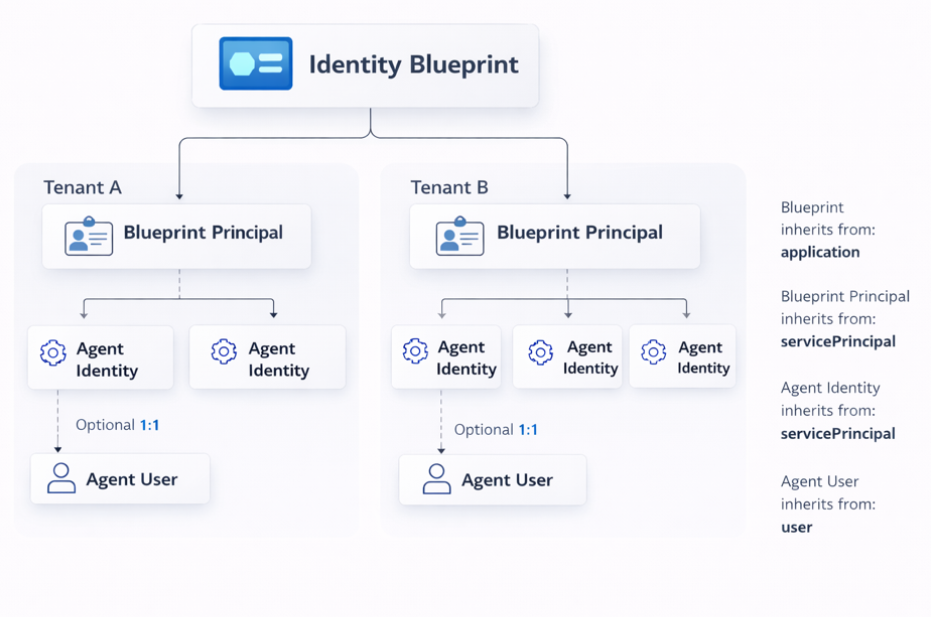
Why this matters: Agent identities are built on top of familiar directory primitives: applications, service principals, and users. That shared foundation is exactly where our finding lives.
Agent ID Administrator role
Microsoft added the Agent ID Administrator role to manage the new Agent Identity control plane. According to the docs, it’s scoped to:
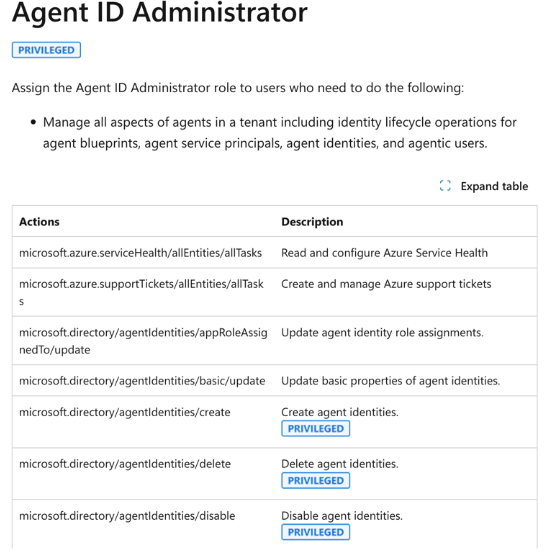
In other words: agent stuff only, not all service principals. That distinction matters. Service principals are the identities behind automation, CI/CD, security tools, and privileged integrations. Whoever controls them controls a big part of the environment.
One more observation: the docs say this role is privileged, but in the Entra UI (which is based on the beta directory role definitions) it isn’t shown as such. That can lead admins to assign it without the same scrutiny they’d give to privileged roles.
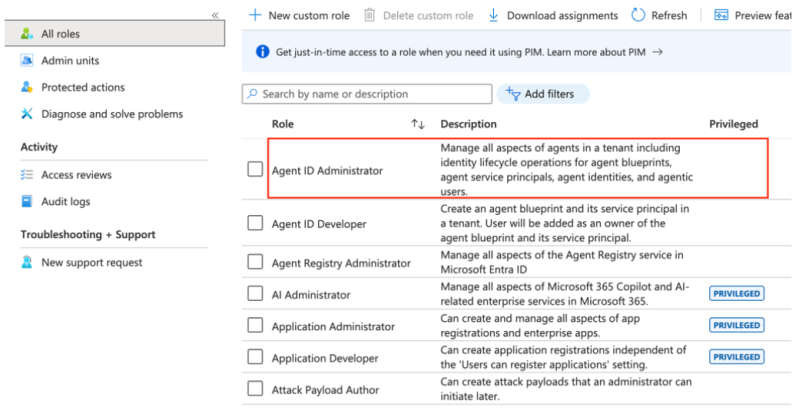
Microsoft confirmed that the discrepancy between the Entra UI and the documentation regarding the “privileged” indicator will be fixed.
Where the boundary breaks
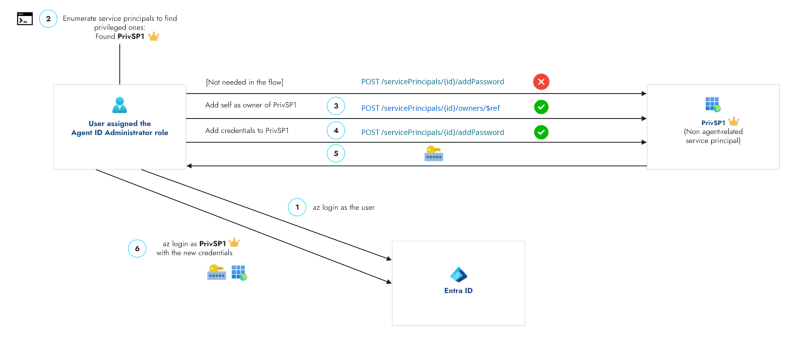
Here’s what we saw: A user assigned the Agent ID Administrator role can add themselves as an owner of service principals beyond agent-related identities, including arbitrary service principals in the tenant. From there, they can add credentials and authenticate as those applications.
Step 1: Addowner(s) (succeeded against non-agent service principals; you can add yourself or other principals):

Step 2: Add credentials (only worked after we had become owners):

The bottom line: Ownership is a takeover primitive – become owner, then add a secret and authenticate as that service principal.
While the role is meant for agent identities, in practice it can change ownership on any service principal.
Why we think this happens: Some of the agent identities are implemented as service principals (and related types). The role has actions like:
microsoft.directory/agentIdentities/owners/updatemicrosoft.directory/agentIdentityBlueprintPrincipals/owners/update
So, admins can manage owners of agent objects. If those checks aren’t strictly limited to agent-backed service principals, the permission leaks onto the general service principal plane.
A classic scoping gap when one object type inherits from another.
We did not see the same for applications: adding self as owner on the Application resource was denied. So, the issue appears specific to the service principal surface.
Following the fix, attempts to assign ownership over non-agent service principals using the Agent ID Administrator role are now blocked. The operation results in the following error:

Impact
Service principal takeover
Gaining ownership of a service principal provides a powerful foothold in an attack path. Once an attacker becomes an owner, they can add credentials, authenticate as the service principal, and operate within the scope of its existing permissions, such as API access, directory roles, or integrations.
The impact depends on the privileges assigned to the targeted service principal. In environments where service principals are widely used or hold elevated permissions, this can lead to significant escalation. Tenant posture can further influence the impact, for example in cases of broadly consented applications or permissive configurations.
Prior to the fix, the Agent ID Administrator role allowed assigning ownership over service principals beyond agent-related identities, effectively enabling similar capabilities to roles such as Application Administrator, but without being scoped specifically to agent use cases.
When the target is privileged
The escalation angle is simple: if a service principal has elevated rights (directory roles, high-impact Graph permissions), taking it over means you get those rights. Many organizations have such service principals.
You can discover which service principals are privileged and then target them. In practice, that means two kinds of checks:
- Service principals with privileged directory roles: Use the Microsoft Graph API (Beta,
isPrivilegedon role definitions) to list which service principals hold admin-level directory roles. - Service principals with high-impact Graph permissions: Query app role assignments to Microsoft Graph for sensitive permissions (e.g.
Directory.ReadWrite.All,RoleManagement.ReadWrite.Directory,Application.ReadWrite.All).
Enumerate privileged service principals
Run the following after az login. Requires jq. Use an account that can read role assignments and app role assignments (e.g. Agent ID Administrator).
1. Service principals with privileged directory roles
BASE="https://graph.microsoft.com"
roles="$(az rest -m GET --url "${BASE}/beta/roleManagement/directory/roleDefinitions?\$filter=isPrivileged eq true&\$select=id,displayName" -o json)"
u="${BASE}/beta/roleManagement/directory/roleAssignments?\$expand=principal(\$select=id,displayName)&\$top=999"
{
  echo -e "SP_NAME\tSP_ID\tROLE"
  echo -e "--------\t------\t----"
  while :; do
    j="$(az rest -m GET --url "$u" -o json 2>/dev/null)" || break
    jq -r --argjson roles "$roles" '
      ($roles.value | map(select(.displayName|test("Reader";"i")|not) | {key:.id, value:.displayName}) | from_entries) as $r
      | .value[]
      | select(.principal."@odata.type"=="#microsoft.graph.servicePrincipal")
      | select($r[.roleDefinitionId] != null)
      | [.principal.displayName, (.principal.id // .principalId), $r[.roleDefinitionId]] | @tsv
    ' <<<"$j"
    u="$(jq -r '."@odata.nextLink"//empty' <<<"$j")"
    [[ -z "$u" ]] && break
  done | sort -t$'\t' -k1,1
} | column -t -s $'\t'
2. Service principals with high-impact Graph app permissions
BASE="https://graph.microsoft.com"
PERM_IDS='["9e3f62cf-ca93-4989-b6ce-bf83c28f9fe8","06b708a9-e830-4db3-a914-8e69da51d44f","1bfefb4e-e0b5-418b-a88f-73c46d2cc8e9","19dbc75e-c2e2-444c-a770-ec69d8559fc7","dd199f4a-f148-40a4-a2ec-f0069cc799ec","50483e42-d915-4231-9639-7fdb7fd190e5","01c0a623-fc9b-48e9-b794-0756f8e8f067","62a82d76-70ea-41e2-9197-370581804d09","cc117bb9-00cf-4eb8-b580-ea2a878fe8f7"]'
PERM_NAMES='{"9e3f62cf-ca93-4989-b6ce-bf83c28f9fe8":"RoleManagement.ReadWrite.Directory","06b708a9-e830-4db3-a914-8e69da51d44f":"AppRoleAssignment.ReadWrite.All","1bfefb4e-e0b5-418b-a88f-73c46d2cc8e9":"Application.ReadWrite.All","19dbc75e-c2e2-444c-a770-ec69d8559fc7":"Directory.ReadWrite.All","dd199f4a-f148-40a4-a2ec-f0069cc799ec":"RoleAssignmentSchedule.ReadWrite.Directory","50483e42-d915-4231-9639-7fdb7fd190e5":"UserAuthenticationMethod.ReadWrite.All","01c0a623-fc9b-48e9-b794-0756f8e8f067":"Policy.ReadWrite.ConditionalAccess","62a82d76-70ea-41e2-9197-370581804d09":"Group.ReadWrite.All","cc117bb9-00cf-4eb8-b580-ea2a878fe8f7":"User-PasswordProfile.ReadWrite.All"}'
GRAPH_SP_ID="00000003-0000-0000-c000-000000000000"
az rest --method GET --url "${BASE}/v1.0/servicePrincipals(appId='${GRAPH_SP_ID}')/appRoleAssignedTo" -o json 2>/dev/null \
  | jq -r --argjson ids "$PERM_IDS" --argjson names "$PERM_NAMES" '
    ["SP_NAME", "SP_ID", "PERMISSIONS"], ["--------", "------", "-------------"],
    ([.value[] | select(.appRoleId as $rid | $ids | index($rid))] | group_by(.principalId)[] |
      [.[0].principalDisplayName, .[0].principalId, ([.[].appRoleId | $names[.]] | join(", "))]) | @tsv
  ' | column -t -s $'\t'
Note: These techniques don’t specifically filter for non-agent service principals.
End-to-end attack flow
The figure below pulls enumeration (the scripts above) and takeover into a single view.
Demo recording
The clip shows the flow: find a privileged service principal (we only searched directory roles for the demo), take it over, then sign in.
Demo: A test user with Agent ID Administrator takes over a privileged non-agent service principal (assigned the Global Administrator role), then signs in with the new credentials – privilege escalation.
The demo was simulated with the Graph beta API; we also confirmed the same behavior of the bug on v1.0.
Real-world snapshot
We looked at customer environments: the Agent ID Administrator role isn’t in wide use yet, but the setup for the escalation path already is. About 99% of tenants have at least one privileged service principal (not necessarily agent-related). A bit more than half use agent identities – and of those, almost half have over 100. As more organizations assign the role to manage agent identities, the scope gap becomes a real risk.
Takeaways
Microsoft has addressed this issue, but the takeaway remains: new identity types are often built on top of existing primitives, which can lead to gaps in how role permissions are scoped. In this case, it resulted in broader access than intended. Validating these assumptions is essential. Additionally, the overall risk is influenced by tenant posture, particularly around privileged service principals, where ownership abuse remains a well-known and impactful attack path.
Why this was easy to miss
- Ownership changes on service principals can look like normal app-admin activity unless you correlate who performed the action with the target service principal type.
- Roles that are not clearly marked as highly privileged in the Entra UI may be assigned with less scrutiny.
- There is no built-in signal that highlights when a role is acting outside its expected scope; this requires correlating role activity with the affected resource.
Recommendations
- Monitor sensitive role usage: especially actions involving service principal ownership or credential changes.
- Alert on service principal ownership changes: these are among the highest-signal events in Entra app governance.
- Treat privileged service principals as crown jewels: audit which service principals have directory roles or high-impact Graph permissions; protect and monitor them.
- Audit credential creation on service principals: new secrets or certs on high-value service principals should be rare and reviewed.
Detections
Note: These detections were created for the issue described, but since it has been fixed, they can be used as templates for identifying similar patterns.
Accounts assigned the Agent ID Administrator
- Via Azure CLI: get current assignments:
# Role definition ID for Agent ID Administrator
     az rest --method GET \
       --url "https://graph.microsoft.com/v1.0/roleManagement/directory/roleAssignments?\$filter=roleDefinitionId eq 'db506228-d27e-4b7d-95e5-295956d6615f'" \
       --query "value[].principalId" -o tsv
- Via Log Analytics (AuditLogs): query role assignment activities for the Agent ID Administrator role (adjust table and time range as needed).
AuditLogs
| where OperationName has "Add member to role"
| where tostring(TargetResources) has "db506228-d27e-4b7d-95e5-295956d6615f" //
Agent ID Administrator
| mv-expand TR = TargetResources
| summarize
    Role = max(iff(TR.type == "Role", tostring(TR.displayName), "")),
    Assignee = max(iff(TR.type != "Role", tostring(TR.displayName), "")),
    AssigneeUPN = max(iff(TR.type != "Role", tostring(TR.userPrincipalName),"")),
    AssigneeId = max(iff(TR.type != "Role", tostring(TR.id), ""))
by TimeGenerated,
   Result,
   Actor = coalesce(tostring(InitiatedBy.user.userPrincipalName),
                    tostring(InitiatedBy.app.displayName))
| order by TimeGenerated desc
Activities (Log Analytics / AuditLogs)
- Add owner to service principal: successful events. Adjust time range as needed.
let AgentIdAdminActors = dynamic(["obj-id1","obj-id2"]);  // principals assigned
Agent ID Administrator
AuditLogs
| where OperationName == "Add owner to service principal"
| where Result == "success"
| where coalesce(InitiatedBy.user.id, InitiatedBy.app.id) in (AgentIdAdminActors)
| order by TimeGenerated desc - Add credentials to service principal: successful events.
AuditLogs
| where OperationName == "Add service principal credentials"
| where Result == "success"
| project
    TimeGenerated,
    OperationName,
    Result,
    Actor = coalesce(InitiatedBy.user.userPrincipalName,
                     InitiatedBy.app.displayName),
    TargetSP = TargetResources[0].displayName,
    TargetSPId = TargetResources[0].id
| order by TimeGenerated desc
Disclosure timeline
- February 24, 2026 – Vulnerability identified
- March 1, 2026 – Report submitted to Microsoft (MSRC)
- March 3, 2026 – Case opened by Microsoft
- March 26, 2026 – Microsoft confirmed the behavior
- April 4, 2026 – Fix reached pre-release stage and the behavior was no longer reproducible
- April 9, 2026 – MSRC has confirmed the fix has been fully rolled out
Agent identities are part of the broader shift toward non-human identities, built for the age of AI agents. The Microsoft Agent Identity Platform is a strong step forward in how organizations can manage and govern them.
This research highlights an important aspect of that model: agent identities rely on existing identity components such as service principals. When role permissions are applied on top of shared foundations without strict scoping, access can extend beyond what was originally intended. In this case, that gap led to broader access, especially when privileged service principals were involved.
Microsoft has addressed this issue, but it reinforces a broader takeaway: validating how roles are scoped and where permissions apply is essential, particularly when dealing with shared identity components.
For actionable guidance on monitoring and hardening your environment, see the Recommendations under the Takeaways section above.